
- ChatGPT Voice: tap the Voice icon in the message bar (app) or prompt box (chatgpt.com), allow the microphone, start talking. Works on Android, iOS and the web.
- Gemini Live: in the Gemini app, tap Live at the bottom or swipe left. Gemini Live is mobile only for now: it is not available in the Gemini web app.
- Is it free? Yes, both have voice on the free plan, with limits. ChatGPT Free gets “limited” Live access with no published number; Go and Plus get 3 hours per rolling 24 hours. Gemini Live is listed on Google’s free plan, and paid tiers raise the overall usage limit.
- Not working? Check the microphone permission, update the app, then check whether you hit your limit.
Talking is the fastest way to use an AI assistant when your hands are busy: cooking, driving, walking, or rehearsing a presentation out loud. ChatGPT and Gemini both ship a real-time voice mode where you can interrupt, change topic, and have the reply spoken back to you, much like a phone call.
This guide covers how to turn each one on, on your phone and on your computer, what the free plan actually gives you, what happens to your audio, and how to fix the most common problems. Everything here comes from OpenAI’s and Google’s own help pages and pricing pages, checked on October 30, 2026.
How to Turn On ChatGPT Voice
OpenAI calls the feature ChatGPT Voice. It runs in the mobile app and in the browser.
On Android and iPhone
- Open the ChatGPT app and make sure it is up to date.
- Tap the Voice icon in the message bar.
- If asked, allow microphone access.
- On your first Voice conversation, pick a voice.
- Start talking once Voice opens.
During the call, tap the microphone control to mute yourself and the exit control to hang up. When you end the call, a transcript is added to the same chat.
Two settings worth knowing under Settings > Voice: Start with Voice opens Voice automatically whenever you open ChatGPT to a new chat, and the background conversation setting keeps the call going while you use other apps or lock your phone. On iPhone, ChatGPT also works in Apple CarPlay.
On the web (chatgpt.com)
- Go to chatgpt.com and sign in.
- Click the Voice icon in the prompt window.
- Allow your browser to use the microphone.
- Start talking.
There is also Voice in the ChatGPT desktop app for macOS and Windows, but OpenAI says it has separate pricing and limits. If you just want to talk to ChatGPT on a computer, chatgpt.com in a browser is the simplest route.
Live vs Advanced vs Standard
Under Settings > Voice you may see three options:
| Option | What it does |
|---|---|
| Live | The current default. Listens and speaks at the same time, so you can interrupt naturally. Can use web search, memory and on-screen visual cards (weather, maps, sports). No video or screen sharing. |
| Advanced | The previous real-time Voice. Pick it on mobile when you need camera or screen sharing. |
| Standard | Turn by turn: transcribes your speech first, then answers. |
Which options you see depends on your plan, region, app version and parental controls. Live runs on GPT-Live-1.1 or the lighter GPT-Live-1.1 Quip, depending on your plan. We covered why OpenAI rebuilt voice around a model that listens while it speaks in What Is GPT-Live? .
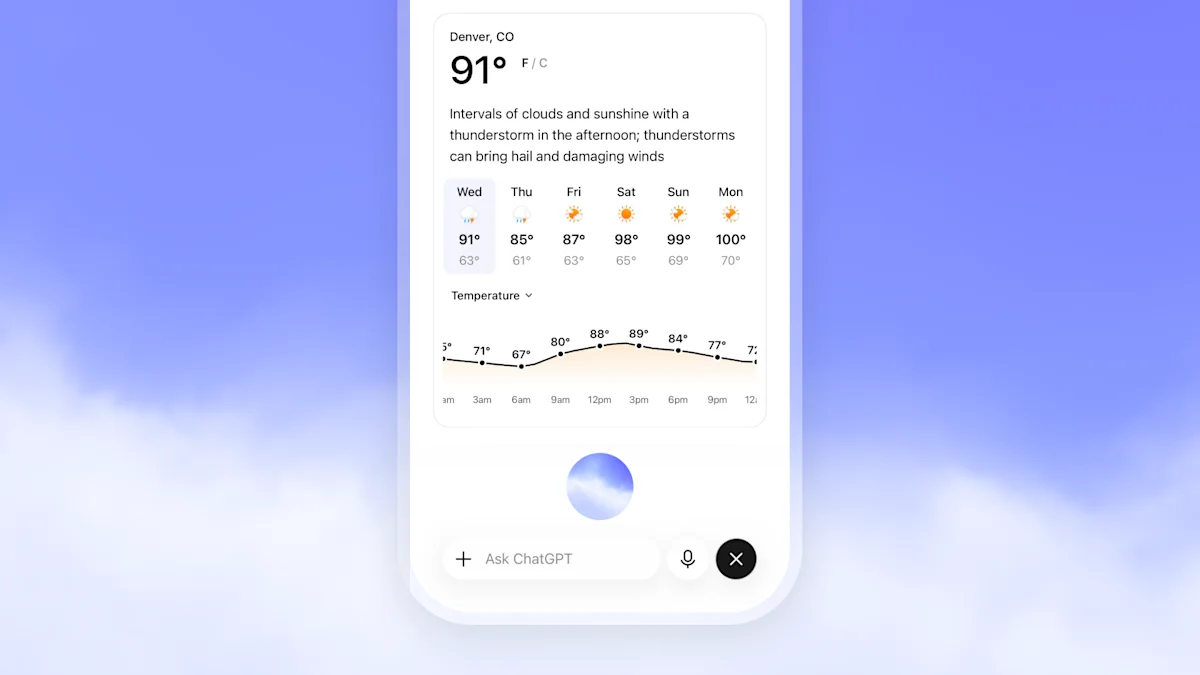
While Voice is active, you can also type or attach an image with the add button, and ChatGPT keeps answering in Voice without starting a new chat.
Changing the voice
Go to Settings > Voice > Voice and pick one of nine voices: Arbor, Breeze, Cove, Ember, Juniper, Maple, Sol, Spruce or Vale. Live adds language-specific voices for Brazilian Portuguese, French, German, Hindi, Japanese, Korean and Mexican Spanish, plus an extra English voice, Bubbie. Changing the voice mid-call starts a new voice call in the same chat.

How to Use Gemini Live
Google’s voice mode is Gemini Live. The big catch: according to Google’s help center, Gemini Live is not available in the Gemini web app for now. You need a phone or tablet.
On Android
- Open the Gemini app. Keep the Google app updated too.
- Tap Live at the bottom of the screen, or swipe left.
- The first time, follow the on-screen steps (including microphone access).
- Start talking.
If Gemini is your phone’s assistant, you can skip the app and say “Hey Google, let’s talk Live” or “Hey Google, let’s talk”.
On iPhone and iPad
- Install the Gemini app from the App Store and sign in with your Google Account.
- Tap Live at the bottom, or swipe left.
- Allow microphone access the first time.
- Start talking.
On both platforms you need to be 13 or older (or the applicable age in your country) and signed in. With a work or school account, your admin has to have Gemini turned on.

The Live controls
- Hold: turns off the mic and pauses the chat. Tap Live to resume.
- Mute: turns off your mic while Gemini keeps talking, and the session stays open.
- End (or swipe right): closes the session and shows the transcript. You can keep going by typing in the same chat, then tap Live again to switch back to voice.
- Camera and screen sharing: show Gemini what your camera sees, or share your screen. Screen sharing needs Gemini Live notifications turned on.
- Captions: tap the captions button at the top right to read Gemini’s replies as well.
To change Gemini’s voice, go to Menu > your profile picture > Settings > Gemini’s Voice. Google notes this option is not available in every language. One more limitation: Gems cannot be used in Gemini Live.
If you are curious about the model side, our Gemini 3.8 Live API guide covers the developer version of Google’s voice model, with per-minute pricing.
Can you use Gemini Live on PC?
Not as a real Live conversation. Your options on a computer are:
- gemini.google.com: dictate a prompt with the mic in the prompt box, then tap Listen next to a reply to have it read aloud. That is voice typing plus read-aloud, not a back-and-forth call.
- Gemini app for Mac: supports mic dictation and “Speak to Window” (hold fn and talk to work on what is in the active window), but not Live.
If you want a true voice conversation on a laptop today, ChatGPT on chatgpt.com is the one that does it.
Is Voice Chat Free? Limits by Plan
Short answer: both start free, and both cap how much you can talk.
ChatGPT Voice limits
OpenAI measures Live usage over a rolling 24-hour window and shows a notice when you reach the cap:
| Plan | Live voice per rolling 24 hours |
|---|---|
| Free | Limited access to GPT-Live-1.1 Quip, no number published |
| Go | 3 hours (GPT-Live-1.1 Quip) |
| Plus | 3 hours (GPT-Live-1.1) |
| Pro (lower tier) | 15 hours (GPT-Live-1.1) |
| Pro (top tier) | Unlimited, subject to abuse guardrails |
OpenAI does not say how many minutes Free users get, only that access is limited and may change. Plus is $20 a month. Go is priced per country (the pricing page showed $6 a month when opened from Turkey). Go and Plus get the same 3 hours; the difference is the model: Go uses the lighter Quip version, Plus gets full GPT-Live-1.1. For what else Plus adds beyond voice, see ChatGPT Work vs Chat limits .
Gemini Live limits
Google’s US subscriptions page lists Gemini Live on the free plan. There is no separate minute cap for Live. Instead, the whole Gemini app runs on a compute-based usage limit that refreshes every 5 hours, up to a weekly cap, and Google does not publish a Live-specific figure.
| Plan | US price | Usage limit |
|---|---|---|
| Free | $0 | Standard |
| Google AI Plus | $4.99 / month | 2x Free |
| Google AI Pro | $19.99 / month | 4x Free |
| Google AI Ultra | $99.99 / month | 5x AI Pro |
| Google AI Ultra (top) | $199.99 / month | 20x AI Pro |
Prices are from gemini.google/us/subscriptions and differ by country. Google also says free users may see their limits tightened first when demand is high.

Does It Understand Other Languages?
Yes. ChatGPT Voice picks up the language you speak, and you can ask it mid-call to switch (“let’s continue in Spanish”), which makes it a decent language practice partner. If it keeps detecting the wrong language, set it explicitly: Settings > Voice > Language, then pick the language you speak most.
Gemini’s help center says that regardless of the app’s display language, Gemini can understand and reply in any supported language you speak in Gemini Live. The mobile app supports dozens of languages.
What Happens to Your Recordings?
ChatGPT: audio clips from Live and Advanced Voice are stored with the chat transcript and kept for 30 days. Deleting the chat deletes its clips within 30 days, except where OpenAI must keep them for security or legal reasons. In Standard mode, audio is deleted right after transcription. Your audio is not used for training unless you turn on Improve the model for everyone and then Include your audio recordings under Settings > Data Controls. With only “Improve the model for everyone” on, transcripts of voice chats can still be used for training.
Gemini: Live recordings and transcripts are saved in Gemini Apps Activity when Keep Activity is on. With it off, Live chats are stored for up to 72 hours. With Keep Activity on, Live transcripts can be used to improve Google services, but your audio, video and screen shares are not used by default. If you opt in to sharing them, some clips may be reviewed by humans. Google also asks you to get permission before recording other people in a Live chat.
ChatGPT Voice or Gemini Live Not Working? Fixes
The Voice or Live button is missing
- Update the app. Both companies gate features by app version. On Android, Gemini Live also needs an up-to-date Google app.
- Make sure you are signed in.
- In ChatGPT, options depend on plan, region and parental controls; a linked teen account may have Voice turned off by a parent.
- On a work or school Google account, your admin may have Gemini disabled.
- On a computer, stop looking for Gemini Live: it is not on the web.
It cannot hear me
- Android: Settings > Apps > ChatGPT (or Gemini) > Permissions > Microphone. iPhone: Settings > ChatGPT > Microphone.
- Browser: click the site controls icon in the address bar, allow the microphone for chatgpt.com, and reload.
- With Bluetooth earbuds connected, check which microphone is active.
It keeps interrupting me
- Use headphones and move somewhere quieter. On iPhone, open Control Center during the call, tap Mic Mode and turn on Voice Isolation.
- Tell ChatGPT at the start: “Wait until I ask you to respond.”
- In Gemini, you can turn off Interrupt Live responses in settings. You can still cut Gemini off by tapping the screen.
The call ended on its own
- ChatGPT ends Voice when you hit your usage limit, the maximum session length, or the context limit of a long chat. Continue in text or start a new call. Only one Voice conversation can be open at a time.
- If Gemini Live pauses when you lock an Android phone, “Gemini on lock screen” is off. Background use also needs Gemini Live notifications on.
Which One Should You Use?
- On a computer: ChatGPT. chatgpt.com gives you a full voice call in the browser; Gemini Live does not exist on the web.
- As your Android assistant: Gemini. “Hey Google” activation, direct hooks into Calendar, Maps and other Google apps, plus camera and screen sharing inside Live.
- For long daily sessions: ChatGPT Go or Plus gives a clear 3 hours per day. Gemini does not publish a Live figure, but its limit refreshes every 5 hours.
Want an AI voice for narration rather than conversation? Our guide to Gemini 3.8 TTS free limits covers turning text into speech.
FAQ
Is ChatGPT Voice free?
Yes, with limits. Free users get limited access to Live on GPT-Live-1.1 Quip, and OpenAI does not publish the number of minutes. Go and Plus get 3 hours per rolling 24 hours, and the top Pro tier is unlimited, subject to abuse guardrails. Plus costs $20 a month.
How do I turn on ChatGPT voice mode?
Tap the Voice icon in the message bar of the ChatGPT app, or in the prompt box on chatgpt.com, allow microphone access, pick a voice the first time, and start talking. Switch between Live, Advanced and Standard under Settings > Voice.
Is Gemini Live free?
Yes. Google lists Gemini Live on the free plan. Paid tiers such as Google AI Plus ($4.99 a month in the US) and AI Pro ($19.99) raise the overall Gemini usage limit 2x and 4x. Google does not publish a separate minute limit for Live.
Can I use Gemini Live on PC?
Not for now. Google’s help center says Gemini Live is not available in the Gemini web app. On a computer you can dictate prompts with the mic and use Listen to hear replies, but for a real voice conversation you need the Gemini app on Android or iOS.
Why is ChatGPT Voice not working?
The usual causes are a blocked microphone permission, an outdated app, or a reached usage limit. Update the app, allow the microphone in your phone or browser settings, and check whether ChatGPT showed a limit notice. Plan, region and parental controls also affect which voice options appear.