
- What it is: the agent mode OpenAI added next to Chat on July 9, 2026. You hand it a task, it comes back with a finished file: a deck, spreadsheet, doc, report or a hosted Site.
- What Chat can’t do: internet-connected code execution, a real headless Chrome, files that persist between sessions, sub-agents, and Sites.
- Models: GPT-6 Astra, GPT-6.1 Sol, GPT-6 Sol and GPT-6 Luna, all exclusive to Work and Codex.
- Price: web and mobile need Plus ($20/month) or higher. Free and Go get a limited version in the desktop app only, on GPT-6 Luna.
- Limits: shared with Codex. On Plus, roughly 5-45 Astra or 15-160 GPT-6.1 Sol messages per five hours. Pro has no five-hour cap.
OpenAI’s official answer to “when do I use Work?” is that Chat is for answers and Work is for tasks with a clear outcome. That’s not very useful, since most people have been asking Chat for decks and spreadsheets for years. Simon Willison called it “an extraordinarily confusing and very powerful product” and had to reverse-engineer its tool list to explain it.
This week Uber rolled ChatGPT Work out to all 30,000 of its employees, so it’s worth knowing what it actually does differently. Here’s the practical version: the features that matter, how to switch it on, what each plan gets, and how fast it eats your limits.
What Work Does That Chat Doesn’t
Work is built on Codex, OpenAI’s coding agent, with a friendlier interface for people who don’t write code. On launch day the Codex desktop app became the new ChatGPT desktop app, and the old desktop app was renamed ChatGPT Classic. The differences come down to the tools Work has access to:
| ChatGPT Work | ChatGPT Chat | |
|---|---|---|
| Built for | Finished files, hours-long tasks | Quick answers, short drafts |
| Models | GPT-6 Astra, GPT-6.1 Sol, GPT-6 Sol, GPT-6 Luna | Chat models (no 6.1 Sol) |
| Code execution | Internet access | Sandboxed, no internet |
| Browser | Full headless Chrome | Web search only |
| Files | Persist across sessions | Fresh per chat |
| Sub-agents | Yes | No |
| Sites (hosted web apps) | Yes | No |
| Usage pool | Shared with Codex | Separate |
The internet-connected container is the big one. Chat’s code interpreter is blocked by a proxy, so it can’t install packages or call outside APIs. Work can clone a GitHub repo, install its dependencies and use it against the live web. The browser is a real Chrome instance that loads pages, fills in forms, takes screenshots and runs JavaScript against the DOM. When a site needs a login, it hands control to you, so your password and 2FA code never pass through the model.
Persistent files matter more than they sound. Each Work session gets its own scratch folder, but those folders stick around and later sessions can read them. Willison counted 171 of them in his account.
What You Can Use It For
- Decks and documents from your notes, reports or meeting transcripts. Give it your existing template and it matches the style.
- Comparison spreadsheets that score options against criteria, flag risks and end with a recommendation tab.
- Scheduled tasks that run once, on a schedule, or when something changes. Plus and up also get event triggers: a new Gmail message, a new Slack channel message, or GitHub pull request activity.
- Sites, live dashboards and small web apps hosted on a shareable URL. They’re private by default, and they’re included at no extra cost during the public beta.
- Your apps through plugins: Gmail, Google Drive, Calendar, Slack, Teams, SharePoint, Canva, Dropbox and more. Type
@Google Drivein a prompt to point it at a specific one.
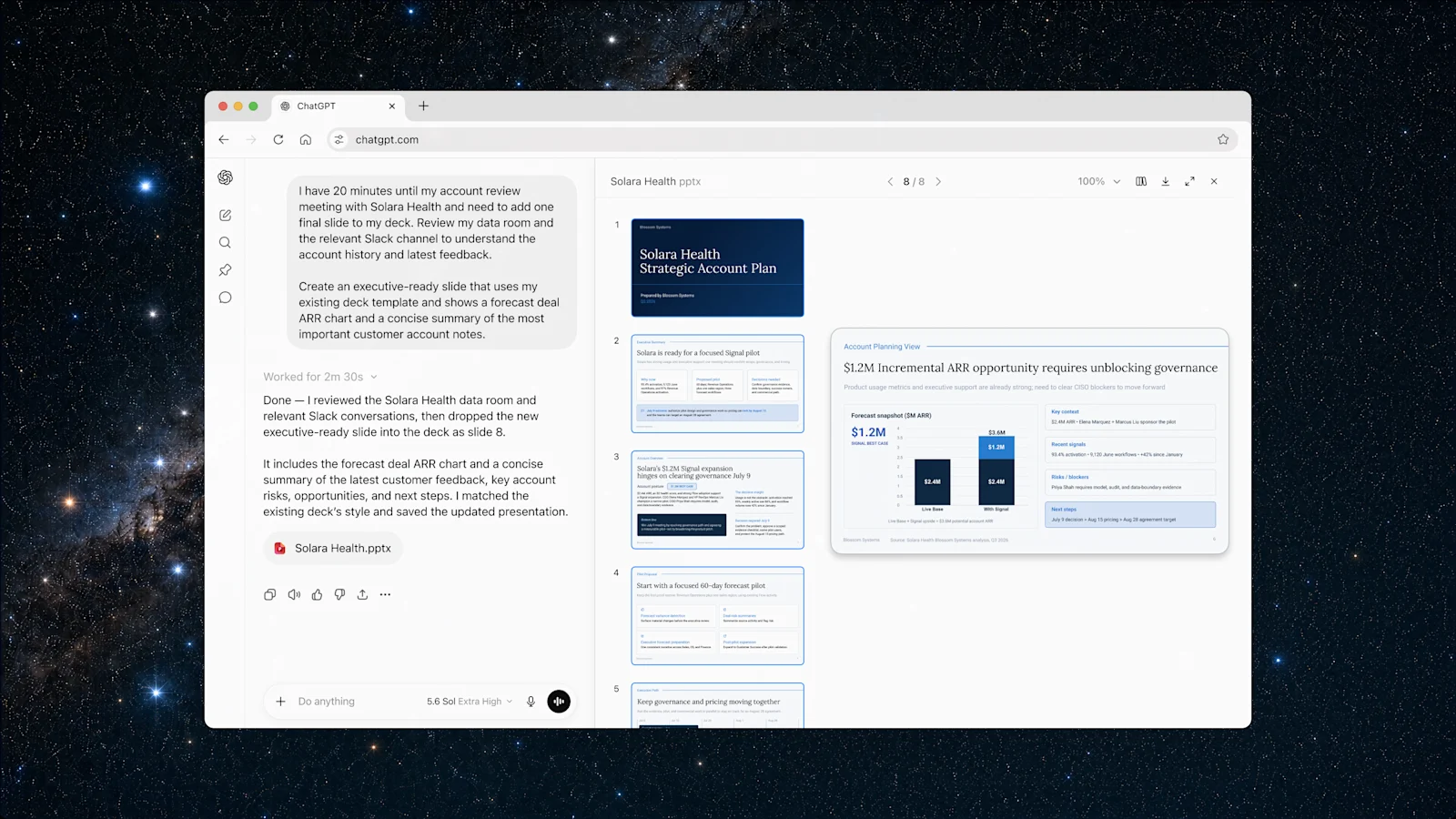
In the desktop app, Work can also open local folders you approve and use Computer Use to click and type across your apps. OpenAI notes that Computer Use and Chrome control are currently limited to certain regions.
How to Use ChatGPT Work
There’s no waitlist or separate app. Where you switch depends on the surface:
- Web (chatgpt.com): pick Work in the Chat / Work selector at the top. If you don’t see it, your plan doesn’t include Work on the web.
- Mobile: choose Work from the dropdown at the top.
- Desktop (Windows and Mac): select ChatGPT from the menu, then Work from the toggle. Codex lives in the same app as a separate view.
Work started on web or mobile runs in the cloud and syncs everywhere, so you can kick off a task on your phone and pick it up at your desk. Local Work on the desktop runs on your computer. Voice works too: tap the Voice control in Work and describe the task. If an action needs approval on web or mobile, you confirm it on screen; spoken approval isn’t supported.
Write prompts like a brief
OpenAI’s tip is to start with a task you already know well, so you can judge the result. Spell out the outcome, the sources, the limits, and when to stop for your review. Instead of “make me a presentation about our customer research”, try:
Review the attached interview notes and survey results. Create an eight-slide presentation for the product leadership meeting. Focus on the three most common customer problems, include supporting evidence, separate findings from recommendations, and flag any claims that are not well supported. Use @Google Drive for the source docs. Return a draft for my review before treating it as final.
Is ChatGPT Work Free? Plans Compared
Work has no separate fee, but what you get depends heavily on your plan:
| Plan | Where Work runs | Models |
|---|---|---|
| Free ($0) | Desktop app only | GPT-6 Luna, subject to rollout |
| Go ($8) | Desktop app only | GPT-6 Luna, subject to rollout |
| Plus ($20) | Web, mobile, desktop | GPT-6.1 Sol, GPT-6 Sol, Luna, limited Astra |
| Pro ($100 / $200 / $500) | Web, mobile, desktop | Full allowance on Astra; Ultrafast on $500 |
Students in the US: the 2026 Back to School offer gives eligible US college and graduate students four free months of Plus, Work included. You verify through SheerID at chatgpt.com/students/2026, and you need a payment method on file. The claim deadline is October 31, 2026, it can be redeemed once, and App Store or Google Play subscriptions aren’t eligible. After four months it renews at $20.
ChatGPT Work Limits on Plus
Work shares one usage pool with Codex; Chat keeps its own. OpenAI’s estimates for Plus, per five hours:
| Model | Plus, messages per 5 hours |
|---|---|
| GPT-6 Astra | 5-45 |
| GPT-6.1 Sol | 15-160 |
| GPT-6 Sol | 15-150 |
| GPT-6 Luna | 350-3,000 |
The ranges are wide because cost scales with the task, not the prompt. A small edit barely registers; a long task that reads dozens of files burns through the window. Cloud tasks can use more than local ones, image generation drains the allowance 3-5x faster, and Fast mode costs 2.5x. Pro plans currently have no five-hour limit.
If you hit the cap mid-task, the current turn still finishes. After that, Plus and Pro users can buy credits instead of upgrading. To stretch your allowance: narrow the sources (“use only these files”), disconnect MCP servers and plugins you don’t need, and use Luna for simple jobs.
Which model? OpenAI’s own guidance: GPT-6 Astra for demanding work that needs careful reasoning or a polished final file, GPT-6.1 Sol for complex work at lower cost, Luna for simple tasks. GPT-6.1 Sol gets a 500,000-token context window in Work with no long-context surcharge. For Astra prompting tips, see how to use GPT-6 Astra ; for Sol pricing, see our GPT-6.1 Sol post .
ChatGPT Work vs Codex vs Claude Cowork
Work vs Codex: same engine, same usage pool. Codex stays the view for code: repos, terminals, tests, pull request reviews. Work is the same agent aimed at documents, spreadsheets and research. If you’ve been using Codex for non-coding tasks, OpenAI says you can keep doing that or move to Work.
Work vs Claude Cowork: Anthropic’s Claude Cowork is the closest rival. It also sits next to Chat, needs a paid plan (from Claude Pro at $20), runs scheduled tasks, splits big jobs into parallel chunks, and has its own built-in browser in the desktop app. The practical differences:
- Free tier: Work has a limited desktop version on Free and Go; Cowork has none.
- Output: Work can publish a hosted Site on a shareable URL and generate images natively. Cowork leans on local folders and your connected tools.
- Where you live: if your team is already inside ChatGPT, Work is the shorter path. If you pay for Claude, Cowork covers the same ground.
Looking for an always-on agent that messages you first instead? See OpenAI Dots and Claude Duet .
Is It Safe?
Work can read your email, browse the web and run code, which is exactly the combination that makes prompt injection dangerous. OpenAI’s answer is auto-review: a separate model checks important actions on connected tools before they happen and tries to block unauthorized sharing of sensitive data. You also decide which actions need your approval. Give Work only the folders and apps a task needs, add “stop before sending anything” to prompts that touch email, and read the instructions before sharing a scheduled task, because they travel with the link.
FAQ
What is the difference between ChatGPT Work and Chat?
Chat is for quick answers and short drafts. Work is an agent for multi-step tasks that end in a finished file, with tools Chat doesn’t have: internet-connected code execution, a full browser, persistent files, sub-agents and Sites. GPT-6.1 Sol is only available in Work and Codex.
Is ChatGPT Work free?
Partly. Free and Go users get a limited version in the ChatGPT desktop app, running GPT-6 Luna. Work on the web and mobile, and the stronger models, need ChatGPT Plus at $20 a month or higher.
What are the ChatGPT Work limits for Plus?
OpenAI estimates roughly 5-45 GPT-6 Astra, 15-160 GPT-6.1 Sol or 350-3,000 GPT-6 Luna messages per five hours on Plus. Usage depends on the task size, weekly limits may apply, and the pool is shared with Codex.
How do I turn on ChatGPT Work?
On the web, pick Work in the Chat / Work selector at the top. On mobile, choose Work from the dropdown. In the desktop app, select ChatGPT from the menu, then Work from the toggle.
Can students get ChatGPT Work for free?
Eligible US college and graduate students can claim four free months of ChatGPT Plus, which includes Work, through the 2026 Back to School offer. The deadline is October 31, 2026, and verification runs through SheerID.