- Google promoted two voice models to general availability on September 15, 2026:
gemini-3.8-liveandgemini-3.8-live-extended-thinking. - Both are audio-to-audio. No speech-to-text model in front, no text-to-speech engine behind. Raw audio in, raw audio out.
- Pricing is quoted per minute as well as per token: $0.005/min for audio input, $0.018/min for audio output. There is a free tier.
- The only difference between the two models is thinking. The standard one rejects
thinkingLevel; Extended Thinking acceptslow,medium,high. - Extended Thinking takes #1 on Artificial Analysis’ Speech to Speech Quality Index at 82.6. Plain 3.8 Live sits second in the Speech Agent Arena.
- It auto-detects and switches between 97 languages mid-conversation.
- The trap: without compression, audio-only sessions cap at 15 minutes and audio-plus-video sessions at 2 minutes.
Google’s September did not end with 3.8 Flash. Today, September 15, 2026, two new stable models landed on the Live side of the Gemini API: Gemini 3.8 Live and Gemini 3.8 Live Extended Thinking.
These are not chat models. You cannot send text and get an essay back. They sit on both ends of a phone line: listening while the user talks, preparing a reply before the sentence ends, and letting the user cut them off.
Here is everything you need to ship one. 👇🏻
What Is Gemini 3.8 Live?
A classic voice assistant is three parts glued together: a speech-to-text model, a language model, a text-to-speech engine. Three hops, three latencies, three line items on the bill.
Audio-to-audio collapses that chain into one model. And the win is not only speed. The moment a middle layer transcribes to text, tone, hesitation, emphasis and accent are thrown away. A single model carries them through.
| Property | Value |
|---|---|
| Model IDs | gemini-3.8-live, gemini-3.8-live-extended-thinking |
| Status | Stable (GA), September 15, 2026 |
| Audio input | Raw 16-bit PCM, 16 kHz, little-endian |
| Audio output | Raw 16-bit PCM, 24 kHz, little-endian |
| Other inputs | Images (JPEG, max 1 FPS), text |
| Languages | 97, with automatic mid-conversation switching |
| Context window | 128k tokens for native audio output models |
| Transport | WebSocket (GenAI SDK or raw) |
| Tools | Function calling, grounding with Search, code execution |
| Watermarking | SynthID on all generated audio |
That sample-rate mismatch is a real trap. You send 16 kHz from the microphone and play back 24 kHz to the speaker. Hard-code one rate on both sides of your audio pipeline and you get chipmunk or slow-motion output.
The language story is less about the count than the switching: the model detects all 97 on its own and follows you when you change language mid-sentence. For anyone who code-switches in normal speech, that is the default behavior rather than a setting.
Visual input is handled in near real-time too. In Google’s demo the model watches the camera, reads the position on a chessboard and suggests a move without breaking conversational flow:
Benchmark Results 📊
The published scores come from audio-specific evaluations, so do not line them up against the text-model tables. The headlines:
| Benchmark | 3.8 Live Extended Thinking | 3.8 Live |
|---|---|---|
| AA Speech to Speech Quality Index | 82.6 (#1) | - |
| Speech Agent Arena | - | 2nd place |
| τ-Voice (agentic task completion) | 68.6% | - |
| Sierra τ-Voice-banking | 35.1% | - |
| Big Bench Audio (reasoning) | 97.7% | - |
| Audio input ($/min) | 0.005 | 0.005 |
| Audio output ($/min) | 0.018 | 0.018 |
The gaps are deliberate rather than missing: Google did not publish both models against every benchmark. Extended Thinking is pushed on the intelligence leaderboards, plain 3.8 Live on user preference in the Arena. Since pricing is identical, Extended Thinking is paid for in latency, not dollars.
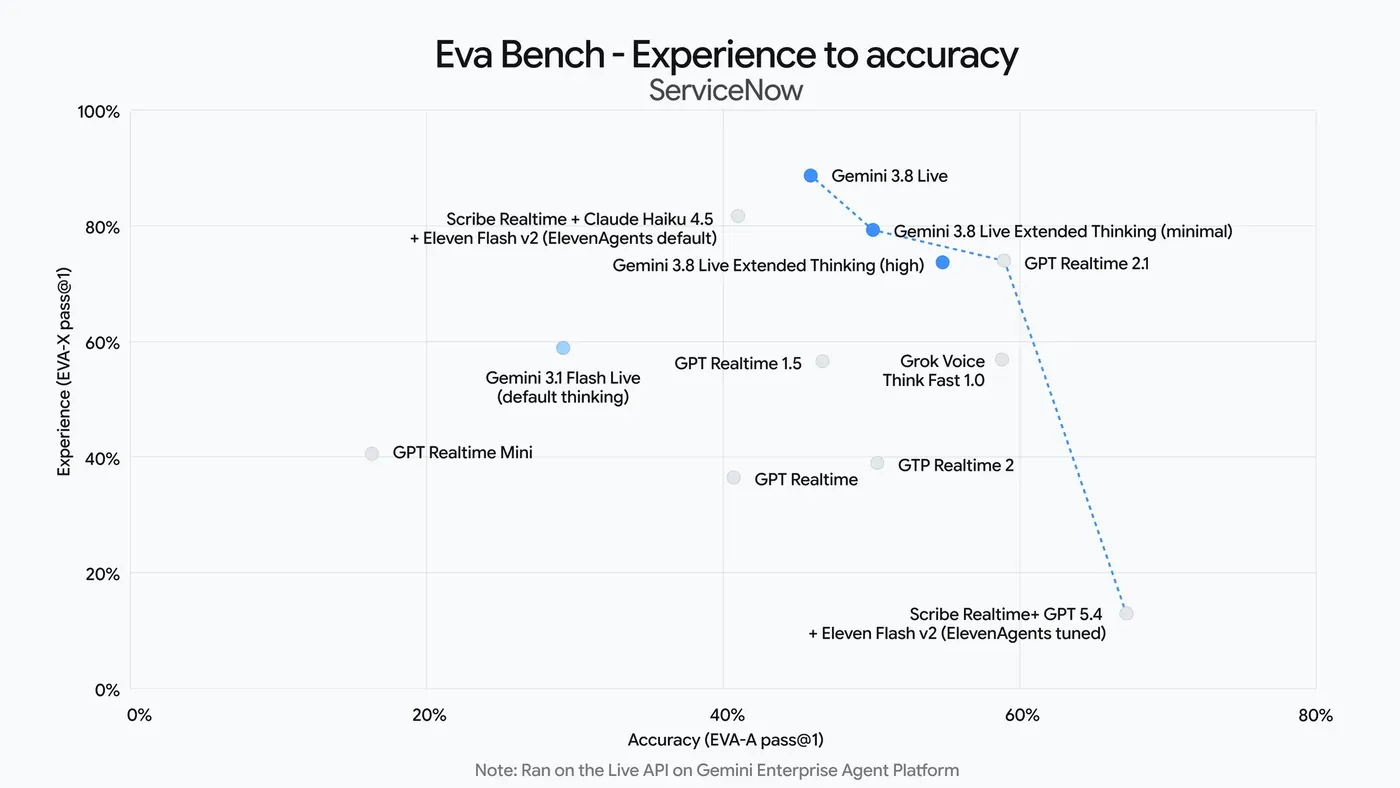
On ServiceNow’s EVA-Bench, which scores voice agents, Google claims both models push the Pareto frontier between accuracy and conversational quality:
Five Minutes to a Working Session
The skeleton, in Python with the GenAI SDK:
from google import genai

client = genai.Client()
model = "gemini-3.8-live"

config = {
    "response_modalities": ["AUDIO"],
    "speech_config": {
        "voice_config": {"prebuilt_voice_config": {"voice_name": "Kore"}}
    },
    "realtime_input_config": {
        "automatic_activity_detection": {"silence_duration_ms": 700}
    },
    "session_resumption": {},
}

async with client.aio.live.connect(model=model, config=config) as session:
    await session.send_client_content(
        turns={"role": "user", "parts": [{"text": "Hi, who are you?"}]}
    )
    async for response in session.receive():
        if response.data:
            # 24 kHz, 16-bit PCM audio chunk
            play(response.data)
Switching to the reasoning variant takes more than swapping the model ID. You also have to add the thinking block:
model = "gemini-3.8-live-extended-thinking"
config["thinking_config"] = {"thinking_level": "medium", "include_thoughts": True}
Do not send that block to plain gemini-3.8-live. It does not support thinkingLevel and the docs say to omit the field entirely from setup.
The phrase Google uses for the Extended Thinking model is worth noting: it reasons and speaks at the same time. Instead of going silent during a long operation it offers early verbal cues like “let me check that” and narrates progress through multi-step background tasks. In a voice interface that is not cosmetic; it is what stops the user hanging up.
In this demo the model turns a paper sketch plus spoken feedback into working React components:
Pricing 💸
Live pricing splits audio and text into separate rows, and quotes audio by the minute:
| Item | Per 1M tokens | Per minute |
|---|---|---|
| Text input | $0.75 | - |
| Audio input | $3.00 | $0.005 |
| Text output | $4.50 | - |
| Audio output | $12.00 | $0.018 |
Both models have a free tier, free of charge within its limits. Grounding with Google Search bills separately: 5,000 free requests per month, then $14 per 1,000.
What a real call actually costs
The per-minute rate makes this concrete. In a two-way conversation the clock splits roughly in half: the user talks for half of it (input), the model for the other half (output).
A 10-minute support call:
- 5 minutes of audio input → 5 × $0.005 = $0.025
- 5 minutes of audio output → 5 × $0.018 = $0.090
- Total ≈ $0.115, about 12 cents per call.
A line handling 500 calls a day lands near $1,725 a month. Compare that to the staffed version and the math argues for itself. One caveat: that figure covers audio only. Your system instruction, conversation history and tool results are billed as text tokens on top. Measure your prompt with our token counter and model the monthly bill with the LLM cost calculator.
The 15-Minute Wall
This is where most Live API projects break in production. The defaults:
- Audio-only session: 15 minutes
- Audio plus video session: 2 minutes
- A single WebSocket connection: roughly 10 minutes
Do nothing and a long call gets cut off mid-sentence. Three mechanisms exist to prevent that.
Context window compression. A sliding-window scheme where you set the token count that triggers compression. Turn it on and a session can run indefinitely, because history is periodically compacted instead of accumulating.
Session resumption. When a connection drops you hold a resumption token, valid for 2 hours after the session terminates. Hand it to a new connection and the conversation continues where it left off instead of restarting cold.
GoAway messages. Before the server closes a connection it warns you, and the message carries a timeLeft field. That is your window to open the next connection so the user never notices. Ignore it and the connection dies as ABORTED.
Any voice agent going to production needs all three wired up. Fifteen minutes feels generous in a demo and never does on a real call.
Barge-in and Silence Tuning
What separates a usable voice agent from a demo is whether you can interrupt it. The Live API handles this through voice activity detection, with three modes: automatic, hybrid and disabled.
Two parameters set the quality:
prefixPaddingMs- how much audio before speech is detected gets included. Trim it too far and you clip the first syllable of every sentence.silenceDurationMs- how long the server waits through silence before ending a speech turn. Google recommends 500-800 ms.
The second one is a genuine tradeoff. Too low and the model talks over a user who is simply drawing breath. Too high and every reply arrives after an awkward pause. Start at the upper end and walk it down against recordings of real users, not your own test script.
Tools That Do Not Block the Conversation
This is the most practical change in 3.8 Live. When a model calls a function - look up an order, check stock, book a slot - classic behavior was: stop, wait for the result, then speak. On a voice call that reads as a dead line.
3.8 Live supports asynchronous function calling with an explicit behavior: NON_BLOCKING. The model fires the tool, keeps talking while it waits (“one moment, I’m pulling up your order”), and folds the result in when it arrives.
Blocking mode and function scheduling options remain for backwards compatibility, so existing code keeps working. For anything new, make NON_BLOCKING your default.
Google’s own demo is exactly this scenario: a multi-step booking runs in the background while the conversation never stops.
Voices and Languages
Live models can use any voice from Gemini’s TTS models: 30 prebuilt options, each with a character. Zephyr is bright, Puck upbeat, Kore firm, Enceladus breathy. You can listen to all of them in Google AI Studio before committing.
Conversation covers 97 languages, and the model switches between them mid-conversation without being told to.
One practical note: a voice that sounds warm in English may not in Spanish, Hindi or Turkish. Audition your chosen voice with your own script, in your target language, before launch.
Every second of generated audio carries a SynthID watermark, woven imperceptibly into the waveform. Your output stays indistinguishable to the ear while remaining machine-detectable as AI-generated.
Migrating from Older Models
If you already run something on Live, two dates matter.
gemini-3.1-flash-live-preview is now marked a legacy preview. The docs are blunt about it: move to Gemini 3.8 Live as the default for most low-latency voice agent experiences. The old model carried a 131,072-token input window and 65,536-token output limit.
Separately, over on the Gemini Omni side, the gemini-omni-flash-preview endpoint retires on September 30, 2026, replaced by the GA gemini-omni-1.1-flash. Different model family, but put it on the same calendar so two migrations don’t collide.
Google has form here: gemini-2.0-flash-live-001 and gemini-live-2.5-flash-preview were both shut down by December 9, 2025. Do not pin production to a preview endpoint.
Which Model for Which Job?
| Need | Model |
|---|---|
| Voice support line, order status, scheduling | gemini-3.8-live |
| Voice advisory, comparisons, multi-step analysis | gemini-3.8-live-extended-thinking |
| Text chat, code, document work | gemini-3.8-flash |
| Video generation and editing | gemini-omni-1.1-flash |
| Reading finished text aloud | Gemini TTS models |
That last row matters. If you already have the text, you do not need the Live API; TTS is cheaper and simpler. Live earns its price only when the conversation has to be two-way and interruptible.
Isn’t “Gemini Live” the Thing on My Phone?
Different product, same name. The Gemini Live you tap in the mobile app is a consumer feature. Gemini 3.8 Live is the model developers call to put that kind of experience inside their own app. This post is about the second one.
The two did converge today, though, because Google shipped the new models into its own products as well:
- 3.8 Live reaches everyone through Search Live, where it powers step-by-step troubleshooting.
- 3.8 Live Extended Thinking goes to Gemini Live, plus Docs for Google AI Pro and Ultra subscribers and Gmail and Keep for all Google AI subscribers.
- On the enterprise side both are in private preview in Gemini Enterprise.
Here is the Search Live version:
What’s Next?
Google DeepMind product lead Logan Kilpatrick has said Gemini 3.5 Pro is in partner testing, and that the team has begun its most ambitious pre-training run yet for Gemini 4. Given three Flash releases in three months, expecting the Live line to sit still would be optimistic.
Frequently Asked Questions
Q: When was Gemini 3.8 Live released? A: Google made Gemini 3.8 Live and Gemini 3.8 Live Extended Thinking generally available on September 15, 2026.
Q: How much does the Gemini 3.8 Live API cost? A: Audio input is $3.00 per million tokens or $0.005 per minute; audio output is $12.00 per million tokens or $0.018 per minute. Text input is $0.75 and text output $4.50 per million tokens. A 10-minute two-way call runs about 12 cents.
Q: Is there a free tier for Gemini 3.8 Live? A: Yes. Both models are free of charge on the free tier within its limits, and you can test them in Google AI Studio. Production traffic needs the paid tier.
Q: What is the difference between Gemini 3.8 Live and Extended Thinking? A: Standard gemini-3.8-live supports interleaved reasoning but rejects thinkingLevel, which should be omitted from setup. gemini-3.8-live-extended-thinking accepts low, medium and high thinking levels plus thought summaries via includeThoughts. Deeper reasoning, slower replies.
Q: How long can a Gemini Live session run? A: Without context window compression, audio-only sessions cap at 15 minutes and audio-video sessions at 2 minutes, with individual connections lasting around 10 minutes. Enable compression and a session can run indefinitely. Session resumption tokens stay valid for 2 hours after termination.
Q: What voices are available in the Gemini Live API? A: Live models can use any of the 30 prebuilt Gemini TTS voices, including Zephyr (bright), Puck (upbeat), Kore (firm) and Enceladus (breathy). All of them can be previewed in Google AI Studio.
Q: Can I connect to the Gemini Live API from a browser? A: Yes, but never with your raw API key in client code. Use ephemeral tokens: your server mints a short-lived token, the browser opens the WebSocket with it, and the real key stays server-side.
Q: What audio format does the Gemini Live API need? A: Input is raw 16-bit PCM at 16 kHz, little-endian. Output is raw 16-bit PCM at 24 kHz, little-endian. The input and output rates differ, so configure both ends of your audio pipeline separately.
Take care… 🙂