
- Gemini Notebook is NotebookLM. Google renamed it on July 16, 2026. Same product, same notebooks, new address: notebook.google.com.
- Free plan: 100 notebooks, 50 sources per notebook, up to 500,000 words or 200 MB per source.
- Usage is now compute-based. Your quota refreshes every 5 hours until you hit a weekly limit. Plus doubles it, Pro gives 4x.
- Students: college students in the U.S. get Google AI Pro free for a year (worth $19.99/month), students in 140+ other markets get Google AI Plus.
- No Windows or Mac app. Use the browser (or install it as a Chrome app), plus the official Android and iOS apps.
If you searched for NotebookLM this semester and landed on something called Gemini Notebook, you are in the right place. Google folded its research notebook into the Gemini brand in July, then switched it from fixed daily caps to a rolling usage quota. Most guides still quote the old “3 Audio Overviews a day” numbers.
This guide covers what the free plan actually gives you today, how the new quota works, what each paid tier adds, how students can get a year of higher limits for free, and how to get useful work out of a notebook in about ten minutes.
Is Gemini Notebook the Same as NotebookLM?
Yes. On July 16, 2026, Google renamed NotebookLM to Gemini Notebook. Josh Woodward, VP of Google Labs, described it as “the same standalone product,” now working more closely with the rest of Google. Every existing notebook carried over, and the old notebooklm.google.com address redirects to notebook.google.com.
The idea has not changed since it debuted as Project Tailwind at Google I/O 2023: instead of answering from the open web or the model’s general knowledge, it answers from the sources you add, and every claim carries a numbered citation you can click to see the exact passage. Google says more than 30 million people and 600,000 organizations use it.
Three things came with the rename:
- Gemini app sync. You can open and create notebooks inside the Gemini app, with full sync to the standalone site.
- Search integration. Google says notebooks are coming to AI Mode in Search.
- A cloud computer per notebook. Gemini Notebook can now write and run code against your sources for data analysis. It launched for Google AI Ultra and is rolling out to Pro users on the web.
Is Gemini Notebook Free? The Current Limits
Yes. Anyone with a Gmail account can use it at no cost. Here is Google’s own plan table:
| Plan | Notebooks | Sources per notebook | AI usage |
|---|---|---|---|
| Free (Standard) | 100 | 50 | Standard |
| Google AI Plus | 200 | 100 | 2x standard |
| Google AI Pro | 500 | 300 | 4x standard |
| Google AI Ultra | 500 | 500 (20 TB) / 600 (30 TB) | 5x or 20x Pro |
How the 5-hour usage quota works
This is the part most older guides get wrong. Gemini Notebook no longer runs on a simple “X Audio Overviews per day” counter. It uses compute-based limits: what you spend depends on how complex your prompt is, which model and feature you use, and how long the chat runs. A quick question costs little; a long Video Overview costs a lot.
- The quota refreshes every 5 hours, until you reach a weekly limit.
- Check what you have left under Settings > Usage (top right).
- In the Studio panel, a bar under each output shows its expected cost before you generate it.
- When you run out, the chat tells you when the limit resets (“Limit reached. All features are available after 3:00 PM”).
- On the web you can pick Generate later: the output is queued and you get a notification when it is done, usually within a couple of hours.
One nice detail: the report, flashcards, infographic, slide deck or Audio Overview that some users see generated automatically when they first add sources does not count against limits.
File size limit and supported sources
Each source can hold up to 500,000 words, or 200 MB for uploaded files. Google Slides are capped at 100 slides and Google Sheets at 100k tokens. Supported inputs:
- PDF, Word (docx), PowerPoint (pptx), text, Markdown, CSV and ePub
- Images (jpg, png, webp, heic and more), including photos of handwritten notes
- Audio files, transcribed on import (mp3, wav, m4a and more)
- Google Docs, Slides and Sheets, which re-sync from Drive every few minutes
- Web URLs (text only, no paywalled pages) and public YouTube videos with captions
- Eligible Play Books ebooks and Gemini chats
Watermarks
Images and videos generated in Gemini Notebook get a visible watermark. Only Google AI Pro and Ultra subscribers can switch it off. On the free and Plus plans it stays. Every output also carries an invisible SynthID watermark.
Free Gemini Notebook Upgrades for Students
Google is running two student offers alongside the September study update:
- U.S. college students: one year of Google AI Pro free, normally $19.99 per month. That means 4x the standard Gemini Notebook usage, 500 notebooks and 300 sources per notebook.
- Eligible college students in 140+ other markets: one year of Google AI Plus free, which doubles the standard usage limits. In Turkey, for example, the offer is open to students 18 and over until December 31, 2026.
You claim it at gemini.google/students with a personal Google account; student status is verified through SheerID. Set a reminder before the twelve months end: the plan renews as a paid subscription unless you cancel it.
How to Use Gemini Notebook, Step by Step
No install needed, just a Google account.
- Open it. Go to notebook.google.com and sign in. On a phone, install the official Gemini Notebook app for Android or iOS.
- Create a notebook. One notebook per course, project or client keeps sources and outputs from bleeding into each other.
- Add sources. Select Add sources on the left and upload files, paste links or import from Drive. You can also type a research question into the search box and let it suggest sources from the web or your Drive.
- Ask grounded questions. Chat in the middle panel. To focus on a subset, tick only those sources on the left. Google’s own tip: instead of “Summarize this source,” ask something like “What are the key findings about dog training in the ‘Dog Training 101’ document?” Naming the source helps it narrow the search.
- Generate study material. Use the Studio panel on the right for Audio and Video Overviews, mind maps, reports, flashcards, quizzes, infographics and slide decks.
- Pick a language. Under Settings > Output Language you can set the language for chat replies, study guides and overviews. Audio Overviews support 80+ languages.
What Gemini Notebook Can Make From Your Sources
| Studio tool | What you get |
|---|---|
| Audio Overview | A podcast-style conversation between two hosts about your sources, in 80+ languages |
| Video Overview | A narrated explainer with visuals; the short version runs about 60 seconds |
| Mind Map | A branching map of how the topics connect |
| Reports | Written summaries such as study guides and briefing documents |
| Flashcards and Quizzes | Questions drawn from your sources; you can add or edit them |
| Infographic | Square, portrait or landscape, at concise, standard or detailed depth |
| Slide Deck | Short, default or long, styled by a prompt you write |
For slide decks, the prompt matters as much as the sources. Something like “10 slides, minimal design, one chart per slide, for a 5-minute class presentation” gets you much closer to usable than the default. The deck only draws on what is in the notebook, so curate the sources first. Note that Cinematic Video Overviews only support English and require a Pro or Ultra plan.
New Study Features (September 2026)
On September 15, Google gave Gemini Notebook a redesign and four study-focused additions:
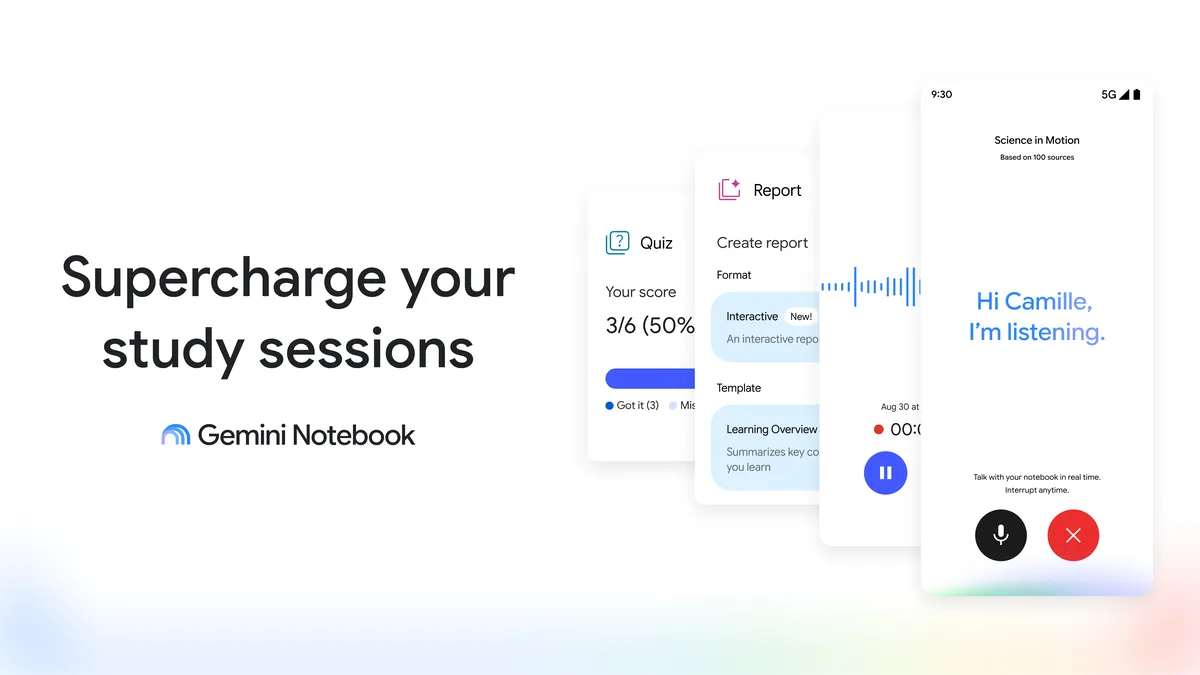
- Voice chat with your notebook. In the mobile app you can have a real-time spoken conversation with your notebook in nearly 100 languages. Answers stay grounded in your sources, and you can interrupt at any point.
- Audio recorder. Record a lecture or your own thinking on the go. The recording lands next to your sources as a note you can chat with and cite.
- Interactive learning overviews. Under Reports, summaries, infographics, quizzes and flashcards are woven into one study session. After a quiz you can ask the chat where you went wrong and what to review next. Short answer, multiple select and fill-in-the-blank quiz formats are on the way.
- Short Video Overviews. Roughly 60-second clips in 80+ languages that mix narration with educational animation, built for formulas, diagrams and scientific concepts. You can share them with classmates.
Is There a Gemini Notebook App for Windows or Mac?
No. Google does not ship a desktop Gemini Notebook app for Windows or Mac; on a computer it runs in the browser at notebook.google.com. To make it feel like an app, open it in Chrome, then use the three-dot menu: Cast, save, and share > Install page as app. It then opens in its own window and taskbar slot. Be wary of sites offering a “Gemini Notebook for Windows” installer; they are not from Google.
There is one official desktop route: the Gemini for desktop app (Windows 10 or later since September, macOS Sequoia or later on Apple Silicon), available at gemini.google/desktop. Its side panel gives you access to your Notebooks.
Limits Worth Knowing
- YouTube: only public videos with captions (auto-generated is fine), and only the transcript is imported. Videos uploaded in the last 72 hours may not import yet.
- Web pages: text only. Images, embedded videos and paywalled pages are skipped.
- Drive access: if you lose access to a Drive file, it stays as an inactive source that still counts toward your source limit.
- Privacy: Google says your data is not used to train Gemini Notebook unless you send feedback, in which case the full interaction may be reviewed. On Workspace and Workspace for Education accounts, nothing is human-reviewed or used for training.
- Accuracy: grounding in sources reduces mistakes but does not remove them. Click the citations on anything you plan to quote or study for an exam.
Gemini Notebook runs on Google’s Gemini models; the plan table lists “higher” and “highest” model access for paid tiers rather than a specific version. For what is new on the model side, see our Gemini 4 Argon price and access post, and for Google’s new agent for work, our Gemini Agent guide .
Frequently Asked Questions (FAQ)
Is Gemini Notebook free?
Yes. The free plan includes 100 notebooks, 50 sources per notebook and a usage quota that refreshes every 5 hours up to a weekly limit. Google AI Plus doubles the quota, Pro gives 4x and Ultra gives 5x or 20x the Pro amount.
What is the difference between Gemini Notebook and NotebookLM?
There is none. Google renamed NotebookLM to Gemini Notebook on July 16, 2026. Existing notebooks carried over and the old notebooklm.google.com address redirects to notebook.google.com.
What are the Gemini Notebook free limits?
On the free plan you get 100 notebooks and 50 sources per notebook, with each source up to 500,000 words or 200 MB. AI usage is compute-based: it refreshes every 5 hours until you reach a weekly cap, and you can check it under Settings > Usage.
Is Gemini Notebook free for students?
U.S. college students can get one year of Google AI Pro free, which gives 4x the standard Gemini Notebook usage. Eligible students in 140+ other markets get one year of Google AI Plus free, which gives 2x. Both are claimed at gemini.google/students with SheerID verification.
Is there a Gemini Notebook app for Windows?
No. There is no official Gemini Notebook desktop app for Windows or Mac; use notebook.google.com in a browser, or install it as an app from Chrome. The separate Gemini for desktop app on Windows and Mac gives side-panel access to your Notebooks, and official mobile apps exist for Android and iOS.
What is the Gemini Notebook file size limit?
Each source can contain up to 500,000 words or 200 MB for uploaded files. Google Slides are limited to 100 slides and Google Sheets to 100k tokens.