- Higgsfield is free to join, but the free plan has 0 credits. The official comparison table lists it as “Limited use”: no monthly credits, one job at a time, and no commercial use.
- Paid plans start at $15/month (Starter, 200 credits). Plus is $39/month billed annually or $49 monthly, Ultra is $99 or $129.
- 200 credits is roughly 100 Nano Banana Pro images, or about 28 five-second Kling 3.0 clips, or just 5 Veo 3.1 clips. The model you pick is the bill.
- It runs inside Claude and ChatGPT through an MCP server at
https://mcp.higgsfield.ai/mcp, and ships a CLI for Claude Code.
Higgsfield is not a model. It is a studio that puts Seedance, Kling, Veo, Sora 2, Nano Banana, GPT Image and a dozen more behind one account and one credit balance, then layers its own tools on top: one-click viral effects, motion transfer, face swap, 4K upscaling and an ad multiplier. It raised $400 million at a $5.4 billion valuation this summer and now claims more than 30 million users.
Most coverage stops at the funding round. Here is what you need before signing up. 👇🏻
Is Higgsfield Free?
Partly. Signing up costs nothing and you can stay on the free plan indefinitely, but the free plan does not come with credits. From the comparison table on the official pricing page:
- Monthly credits: 0. The table labels the tier “Limited use”.
- 1 concurrent job.
- Character creation: up to 1.
- Commercial use: not included. Anything you make for a client or an ad needs Starter or above.
Most Effects templates carry a “Try for free” button. Higgsfield publishes no fixed daily allowance; the “10 credits a day” some sites quote appears on no official page we could find.
The 24-hour unlimited trial Higgsfield ran for new users ended on July 23. It needed a card and rolled into monthly Plus unless cancelled, so set a reminder if a new one appears.
Higgsfield Pricing
| Plan | Billed annually | Billed monthly | Credits / month | Commercial use |
|---|---|---|---|---|
| Free | $0 | $0 | 0 | No |
| Starter | $15/mo | $15/mo | 200 | Yes |
| Plus | $39/mo | $49/mo | 1,000 | Yes |
| Ultra | $99/mo | $129/mo | 3,000 | Yes |
Prices exclude VAT. Starter only gets Seedance 2.0 Fast and Mini; the full Seedance 2.0, start and end frame control and Higgsfield Speak begin at Plus, which also adds 7 days of unlimited Kling 3.0 and Nano Banana 2.
What Do Credits Actually Buy?
Credit cost varies by model. A selection from the pricing page:
| What you generate | Credits |
|---|---|
| Soul 2.0 image (Higgsfield’s own model) | 0.12 |
| Nano Banana Pro image | 2 |
| Face Swap | ~2 |
| Kling 3.0, 720p, 5 s | ~7 |
| Sora 2, 720p, 4 s | ~10 |
| Seedance 2.0 Fast, 720p, 5 s | ~12 |
| Seedance 2.0, 720p, 5 s | ~22 |
| Google Veo 3.1, 720p, 4 s | ~40 |
By Higgsfield’s own math, Starter’s 200 credits cover 100 Nano Banana Pro images or about 11 Seedance 2.0 Fast videos. Spend the same balance on Kling 3.0 and you get around 28 short clips; spend it on Veo 3.1 and you get 5. The gap between the cheap and expensive video models is more than 6x, so iterate cheap and only re-run the keeper on a premium model.
“Unlimited” only applies on higgsfield.ai itself. MCP, CLI and Canvas generations always draw from credits.
What Can You Do With Higgsfield?
1. Text-to-Video and Image-to-Video
Pick a model in Create Video, write a prompt or upload a still. The menu includes Seedance 2.5, Kling 3.0, Veo 3.1, Sora 2, Wan, Hailuo and Grok Video.
Draft on Kling 3.0 at 720p. Most credits disappear in trial and error, not the final render.
2. Image Generation
Nano Banana Pro, GPT Image 2, Seedream, Flux.2 and Higgsfield’s own Soul 2.0, which at 0.12 credits is the cheapest and built for keeping one character consistent across scenes.

Nano Banana Pro understands the same prompts here as it does in Gemini, so our 80s AI photo prompts work unchanged.
3. Viral Effects: Earth Zoom Out, Bullet Time, Eyes In
What made Higgsfield famous on TikTok: dozens of templates, upload a photo, no prompt.
The most searched ones:
- Earth Zoom: the camera pulls away from you all the way out to orbit.
- Bullet Time: the Matrix-style frozen moment with a camera orbiting around it.
- Eyes In: the camera dives through the pupil into an entirely new scene.
- Clones, Melting, Burning Man, Stop World: duplication, melting, fire and time-freeze effects.
4. Genjutsu: Motion Transfer From a Reference Video
Genjutsu moves the motion from an existing video onto a different character, or swaps an object inside the clip, like replacing the bottle in a product shot with yours.
5. Face Swap and Talking Video
Face Swap runs about 2 credits per image. Higgsfield Speak animates a still photo to a voice track and requires Plus. Use both only with your own face or explicit consent.
6. Upscale Video to 4K
Flux 3.0 Video Upscale takes a clip to 4K without stretching pixels. Generate at 720p, upscale only the keeper.
7. Ads and Social Content
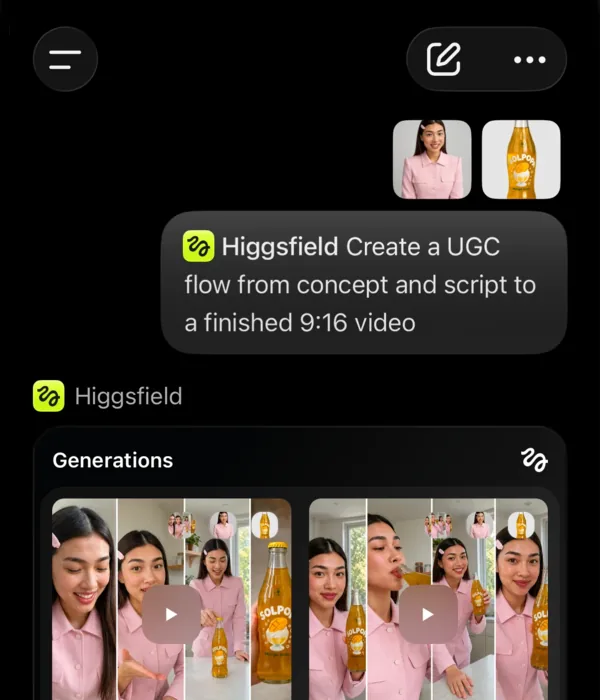
Ad Multiplier turns one ad into ten variants with a new character, outfit, location or language, and UGC Builder produces creator-style product videos.
Higgsfield MCP: Using It From Claude and ChatGPT
“higgsfield mcp” is one of the top Higgsfield searches. Higgsfield publishes a Model Context Protocol server, so you can ask your assistant for “a 9:16 ad for this product” and get the video back in the chat.
Setup:
- Claude (web and desktop): add a custom connector in Settings with the URL
https://mcp.higgsfield.ai/mcp. - ChatGPT: install the Higgsfield plugin, which uses the same endpoint.
- Claude Code: Higgsfield recommends its CLI plus a skills pack:
npm i -g @higgsfield/cli
higgsfield auth login
npx skills add higgsfield-ai/skills
Ready-made workflows cover ad localization, new opening hooks and editable After Effects animation. If you live in Claude Code, this is video generation without leaving the terminal.
How to Cancel a Higgsfield Subscription
Go to Manage Account, then Subscription, and cancel in one click. Plans renew automatically, so cancel before the renewal date, and before the end of any trial you activated with a card.
Which Plan Should You Pick?
Trying viral effects for your own posts: the free account. A few videos and plenty of images a month: Starter, which adds commercial rights. Ads or regular content: go straight to Plus.
Want a zero-cost route instead? Our free AI video generators guide covers tools that cost nothing at all, with fewer features.