- Yes, it is free to use. Both Gemini 3.8 Flash TTS and 3.8 Flash-Lite TTS are “Free of charge” on the Gemini API free tier, and you can use them in Google AI Studio with just a Google account.
- The catch: on the free tier, Google uses what you submit to improve its products, and human reviewers may read your inputs and outputs. Outside the EEA, Switzerland and the UK, keep private text and voices off the free tier.
- Free limits are not published. Google shows your per-model rate limits inside AI Studio, not in the docs.
- Paid pricing: about $0.81 per hour of audio with Flash TTS and $0.54 with Flash-Lite, at launch prices that run until December 31, 2026. On January 1, 2027 they double.
- Voice cloning works from a roughly 30-second sample, but only with a spoken consent recording from the voice’s owner.
- Commercial use: Google does not claim ownership of generated audio. You are responsible for how you use it.
Google shipped two new text-to-speech models on September 23, 2026, and announced them in a launch post: Gemini 3.8 Flash TTS and Gemini 3.8 Flash-Lite TTS. They follow Gemini 3.8 Flash and the Gemini 3.8 Live API, and they do three things: read your script aloud, design a brand-new voice from a text description, and clone a real voice from a short recording.
This guide answers the day-one questions: is it free, what are the limits, what does it cost once you pay, and what are you giving up when you hand Google your voice.
Is Gemini 3.8 TTS Free?
Yes. On the Gemini API pricing page, both models list input and output as “Free of charge” on the free tier. No credit card is needed: sign in to Google AI Studio and generate audio.
There are two free routes:
- Google AI Studio (developers and tinkerers): the full feature set, including voice design, the two-speaker screenplay editor and voice cloning, plus a free API key for code.
- Gemini Notebook (everyone else): Google says Flash TTS is rolling out there “for everyone”. Flash-Lite TTS lands in Google Vids instead.
The Real Price of “Free”
The Gemini API Additional Terms are blunt about unpaid use. On the free tier and in AI Studio, Google uses your prompts and generated audio to “provide, improve, and develop” its products. Human reviewers may read, annotate and process your inputs and outputs. Google disconnects the data from your account and API key before reviewers see it, but the terms still say: do not submit sensitive, confidential or personal information to unpaid services.
Three details matter here:
- EEA, Switzerland and the UK are treated differently. For users there, the paid-tier data terms apply to everything, including AI Studio and the free API quota.
- AI Studio can count as paid. If your account has access to a Cloud project with an active billing account, Google treats your AI Studio use as a paid service, even when you are not being charged.
- You must be 18 or older to use the API.
For a podcast script or a YouTube narration you plan to publish anyway, the free tier is fine. For client material, unreleased manuscripts or anyone’s real voice, use a billed project.
What Are the Free Tier Limits?
Google does not publish per-model free tier numbers for these models in the docs. Your limits (requests per minute and per day) are shown for your own project in AI Studio, and they can differ between accounts and change over time.
Two practical consequences:
- Plan long jobs in chunks. An audiobook will not come out of a single free session. Split it by chapter.
- Upgrading is quick. Setting up billing moves the project from the free tier to Tier 1, and Google says that step usually takes effect immediately.
Gemini 3.8 TTS Pricing: What an Hour of Audio Costs
Google bills TTS audio in tokens: 25 tokens per second of audio, so one minute is 1,500 tokens. The text you send is cheap next to the audio you get back.
| Model | Audio output (per 1M tokens) | Per minute | Per hour |
|---|---|---|---|
| 3.8 Flash TTS, until Dec 31, 2026 | $9 | ~$0.0135 | ~$0.81 |
| 3.8 Flash TTS, from Jan 1, 2027 | $18 | ~$0.027 | ~$1.62 |
| 3.8 Flash-Lite TTS, until Dec 31, 2026 | $6 | ~$0.009 | ~$0.54 |
| 3.8 Flash-Lite TTS, from Jan 1, 2027 | $12 | ~$0.018 | ~$1.08 |
Text input is $0.50 per million tokens on both models until the end of 2026, then $1. In practice, a 10-hour audiobook costs about $8 with Flash TTS today and about $16 next year. If you have a large backlog, the launch window is the time to run it.
Flash TTS vs Flash-Lite TTS
| Gemini 3.8 Flash TTS | Gemini 3.8 Flash-Lite TTS | |
|---|---|---|
| Model ID | gemini-3.8-flash-tts | gemini-3.8-flash-lite-tts |
| Built for | Acting, fidelity, long-form narration | Volume, speed, low cost |
| Languages (per docs) | 130 | 101 |
| Consumer app | Gemini Notebook | Google Vids |
| Voice design and cloning | Yes | Yes |
Google’s own guidance: pick Flash TTS for audiobooks, character work, heavy use of vocal tags, hard pronunciations and regional dialects. Pick Flash-Lite for bulk production, dubbing and voice agents. Flash-Lite is also the direct replacement for gemini-3.1-flash-tts-preview, and both 3.8 models share the same API schema, so switching is a one-word change.
How to Use Gemini 3.8 TTS in Google AI Studio
Google opened a new audio playground in AI Studio for these models. It works like a small voice studio: pick or design a voice, then direct lines in a two-speaker screenplay editor.
- Sign in at aistudio.google.com.
- Open TTS and pick
gemini-3.8-flash-ttsfor quality orgemini-3.8-flash-lite-ttsfor speed. - Choose a voice. The 30 studio voices each have a character: Charon is “Informative”, Kore “Firm”, Sulafat “Warm”, Achernar “Soft”, Puck “Upbeat”. Hundreds more sit in the extended voice library.
- Paste your script. 3.8 models read the text strictly verbatim. If you write “say this excitedly” inside the script, the model will say those words too.
- Put direction outside the script. Sustained delivery (emotion, pace, volume) goes into a separate style instruction. Momentary sounds go inline in angle brackets:
Wait... <short pause> did you hear that? <sigh> - Generate and download. Over the API, the default output is a 24 kHz mono WAV file.
In Code (Gemini API)
Get a free API key in AI Studio, then this is Google’s documented single-speaker example from the speech generation docs:
import base64
from google import genai

client = genai.Client()  # reads GEMINI_API_KEY

interaction = client.interactions.create(
    model="gemini-3.8-flash-tts",
    input=[{
        "type": "user_input",
        "content": [{
            "type": "text",
            "text": "Have a wonderful day!",
            "annotations": [{
                "type": "speech_metadata",
                "style": "cheerful and friendly",
            }],
        }],
    }],
    response_format={"type": "audio"},
    generation_config={"speech_config": [{"voice": "Kore"}]},
)

with open("out.wav", "wb") as f:
    f.write(base64.b64decode(interaction.output_audio.data))
Migrating from an older Gemini TTS model? 3.8 returns a complete WAV file by default, not raw PCM, so drop any code that adds a WAV header.
Voice Cloning: How It Works
Both models can replicate a voice from about 30 seconds of audio. The AI Studio screen recommends around 20 seconds of natural speech, told like a story rather than read in a monotone.
The gate is consent. After the sample, the voice’s owner records a fixed consent statement, and the system checks that both recordings come from the same speaker. According to the voice replication docs, the statement can be recited in 30 locales, and Google recommends recording both clips on the same microphone in the same room so verification does not fail. Grabbing a celebrity’s voice off YouTube does not get through this flow.
What You Give Up When You Clone Your Voice
Reading a script is one thing. Cloning your voice means handing over biometric data, and Google’s own docs call replicated voices “biometric voice profiles”. You can rotate a password. You cannot rotate your voice.
- The consent line is a license. In English it reads: “I am the owner of this voice and I consent to Google using this voice to create a synthetic voice model.” Read it knowing what it says.
- Profiles are stored for a year by default. Stateful voices (
store=True, the default) live in your project with a one-year retention period, up to 200 custom voices per project. If you want nothing kept server-side, the API offersstore=False: you get an encryptedvoicekey_...that your app keeps and that expires after 7 days. Stored voices can be removed withvoices.delete(). - The free tier is the wrong place for a real voice. Everything in the section above applies: unpaid inputs can be seen by human reviewers, and a voice recording is personal information by any definition.
- The voice ID is only as safe as your API key. Anyone holding a leaked key for that project can make your voice say anything. Keep keys out of client code and repos.
- Watermarks detect, they do not prevent. Every clip carries an inaudible SynthID watermark, and replicated voices add C2PA credentials. That helps prove a clip is synthetic after the fact. It does not stop someone from being fooled by it in the moment.
A sensible rule: clone your own voice to try the feature, delete it when you are done, and make a permanent brand voice a deliberate, billed decision.
Can You Use Gemini TTS Audio Commercially?
The Gemini API Additional Terms say Google will not claim ownership of content you generate, that it may generate the same or similar content for others, and that you are responsible for how you and anyone you share it with use that content.
Two conditions to keep in mind before shipping a product:
- Serving users in the EEA, Switzerland or the UK requires paid services. If your app or site exposes Gemini TTS to users there, the free tier is not allowed.
- No under-18 audiences. You cannot use the API in a service directed at, or likely to be used by, people under 18.
This is a summary of Google’s terms, not legal advice. If a voice belongs to someone else, get their written permission on top of the in-product consent recording.
Gemini 3.8 TTS vs ElevenLabs
ElevenLabs is the default answer to “best AI voice generator”, so this is the comparison that matters.
Free plans: according to the ElevenLabs pricing page, the free plan gives 10,000 credits a month, roughly 10 minutes of speech in the app, and does not include a commercial license. Instant voice cloning starts on the $6 Starter plan. Gemini’s free tier does not state minutes; its limits are shown per project in AI Studio.
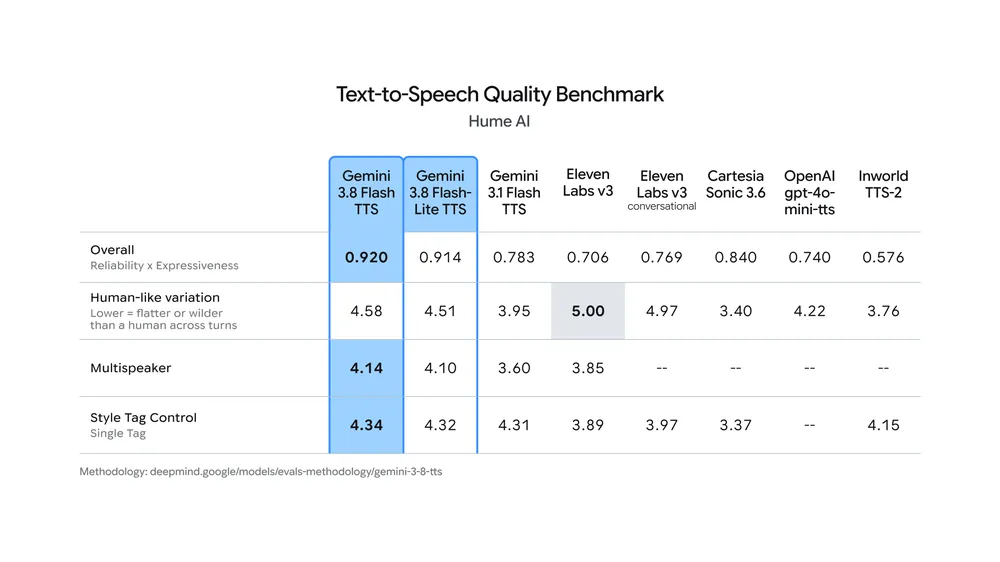
Quality: in the Hume AI benchmark Google published, Gemini 3.8 Flash TTS scores 0.920 overall and Flash-Lite 0.914, against 0.706 for ElevenLabs v3 and 0.769 for v3 conversational. ElevenLabs v3 still wins the “human-like variation” row with 5.00 to Gemini’s 4.58.
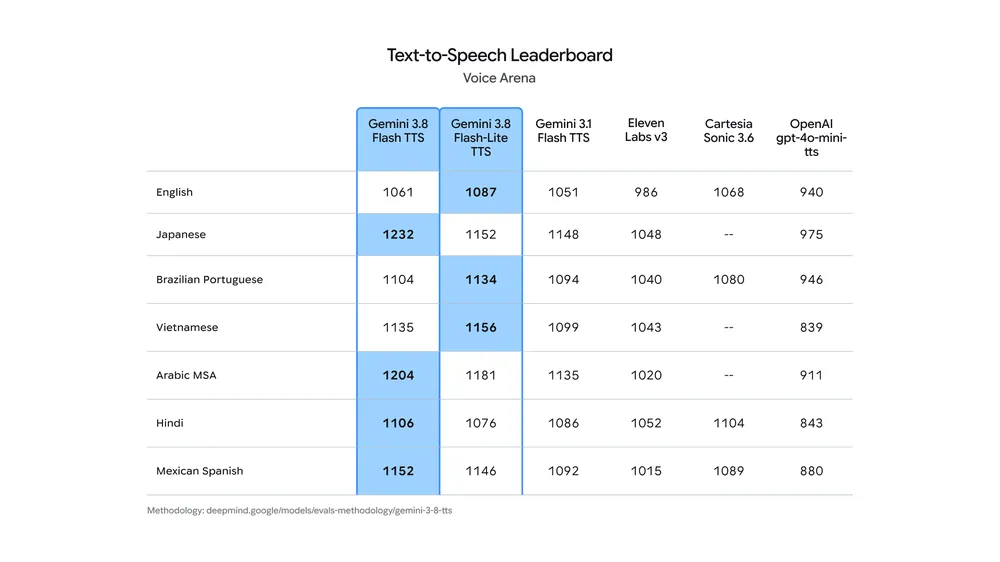
In Voice Arena’s blind human preference tests, the two Gemini models lead in English, Japanese, Brazilian Portuguese, Vietnamese, Arabic, Hindi and Mexican Spanish. In English specifically, Flash-Lite TTS (1087) edges out Flash TTS (1061), while ElevenLabs v3 sits at 986.
On the OpenAI side, OpenAI.fm is still a free way to try their voices in the browser.
Frequently Asked Questions
Is Gemini 3.8 TTS free?
Yes. Gemini 3.8 Flash TTS and Flash-Lite TTS are free of charge on the Gemini API free tier and in Google AI Studio. Free use lets Google use your inputs to improve its products, and human reviewers may read them, except in the EEA, Switzerland and the UK. Flash TTS is also rolling out in Gemini Notebook.
What is the Gemini TTS free tier limit?
Google does not publish per-model free tier limits for Gemini 3.8 TTS in its documentation. Your requests-per-minute and per-day limits are shown for your own project in Google AI Studio. Setting up billing moves the project to the paid Tier 1, usually immediately.
How much does Gemini TTS cost per hour?
About $0.81 per hour of audio with Gemini 3.8 Flash TTS and $0.54 with Flash-Lite TTS, at launch prices valid until December 31, 2026. From January 1, 2027 audio output doubles to $18 and $12 per million tokens. One second of audio is 25 tokens.
Can Gemini TTS clone my voice?
Yes. Both 3.8 models replicate a voice from about 30 seconds of audio, but the voice’s owner must also record a consent statement that is matched against the sample. Stored voices are kept for one year by default and can be deleted, or you can use stateless keys that expire after 7 days.
Can I use Gemini TTS audio commercially?
Google’s Gemini API terms say Google does not claim ownership of generated content and that you are responsible for how it is used. Apps serving users in the EEA, Switzerland or the UK must use paid services, and the API cannot be used in services aimed at under-18s. This is not legal advice.