Hello everyone! In this guide we take a close look at OpenAI.fm: what it is, how to use it, which voices are available, and what the audio models behind it cost in 2026. Let’s dive in! 🎙️
First, have a listen. The clip below was generated on OpenAI.fm in a few seconds:
What Is OpenAI.fm?
OpenAI.fm is an interactive web platform where anyone can try OpenAI’s text-to-speech models for free. Open openai.fm in your browser, type some text, and it speaks it out loud in seconds. The interesting part: you control not just what the voice says, but how it says it (tone, speed, emotion, character).
Three audio models power the platform:
- GPT-4o-mini-tts: The text-to-speech model with steerable speaking style. This is the heart of OpenAI.fm.
- GPT-4o-transcribe and GPT-4o-mini-transcribe: Speech-to-text models that clearly outperform the older Whisper models.
How to Use OpenAI.fm
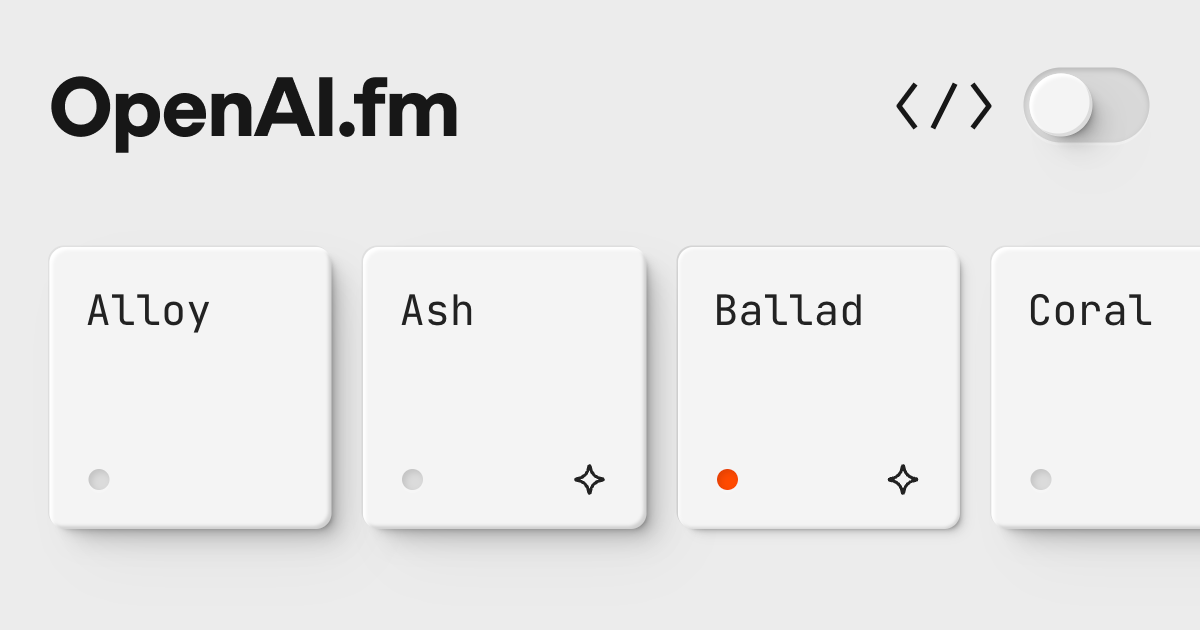
The orange, retro-radio style interface is very simple:
- Go to openai.fm
- Pick a voice character: Alloy, Ash, Ballad, Coral, Echo, Fable, Onyx, Nova, Sage, Shimmer, Verse
- Choose one of the sample scripts or type your own text
- Add a speaking-style instruction in the “Vibe” field (the most innovative part!)
- Hit Generate and listen
You can download the generated audio or share a link to it.
Vibe Instructions: Telling the Voice How to Speak
The real differentiator of GPT-4o-mini-tts is style steering. A few instruction ideas:
- Emotions: “Speak very excited and a little nervous”, “Whisper in a calm, soothing tone”
- Characters: “Speak heavy and authoritative like an old sage”, “Sound monotone and mechanical like a robot”
- Business: “Be clear and energetic like a professional conference presenter”, “Speak softly like an empathetic therapist”
- Creative: “Be an epic movie trailer narrator”, “Read warmly as if telling a children’s story”
Instructions are free-form text; the model is surprisingly good at following them.
How Good Are the Models?
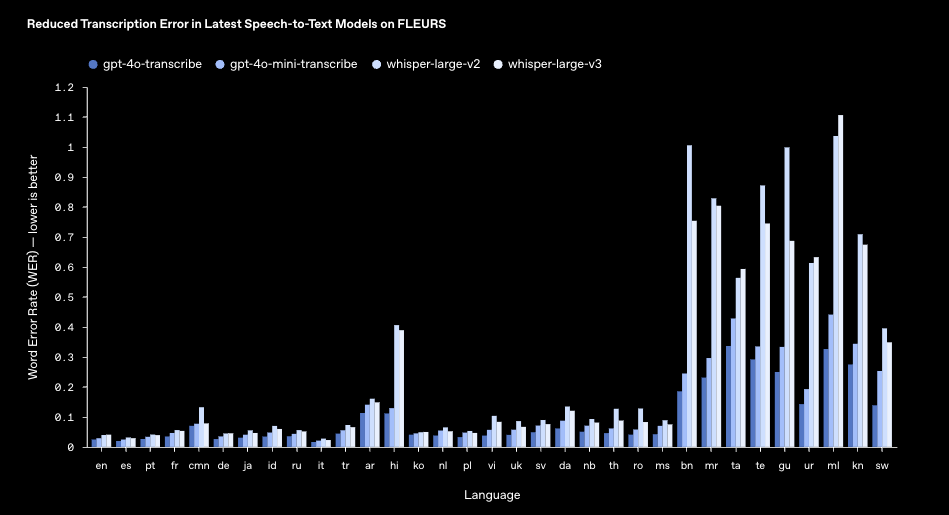
On the FLEURS benchmark the new transcription models beat Whisper in every language. WER (word error rate), lower is better:
| Language | GPT-4o-transcribe | GPT-4o-mini-transcribe | Whisper-large-v3 |
|---|---|---|---|
| English | 0.035 | 0.037 | 0.045 |
| Spanish | 0.049 | 0.051 | 0.068 |
| French | 0.063 | 0.065 | 0.082 |
| Turkish | 0.085 | 0.089 | 0.113 |
| Russian | 0.078 | 0.082 | 0.104 |
| Japanese | 0.097 | 0.102 | 0.138 |
For Developers: API Usage
Everything you play with on OpenAI.fm is available in your own apps. The “Show code” button in the interface gives you the Python, JavaScript, or cURL equivalent of your current voice and instruction settings:
from openai import OpenAI
client = OpenAI()

response = client.audio.speech.create(
  model="gpt-4o-mini-tts",
  voice="alloy",
  instructions="Speak like an excited scientist, high energy and intriguing",
  input="Today I made a groundbreaking discovery! Imagine a particle that completely changes the structure of matter!"
)

response.stream_to_file("output.mp3")
Pricing (Current as of July 2026)
Pricing is token based; the table also shows approximate per-minute costs:
| Model | Task | Token Price | Approx. Cost |
|---|---|---|---|
| gpt-4o-mini-tts | Text to speech | $0.60 / 1M text input + $12 / 1M audio output | ~1.5 cents / minute |
| gpt-4o-transcribe | Speech to text | $2.50 / 1M input + $10 / 1M output | ~0.6 cents / minute |
| gpt-4o-mini-transcribe | Speech to text | $1.25 / 1M input + $5 / 1M output | ~0.3 cents / minute |
| gpt-realtime-whisper | Live transcription | - | ~1.7 cents / minute |
| gpt-realtime-translate | Live speech translation | - | ~3.4 cents / minute |
Concrete example: narrating a 1,000-word blog post produces roughly 5 minutes of audio and costs about 8 cents with gpt-4o-mini-tts. Playing on OpenAI.fm itself is free.
What’s New in 2026: OpenAI Voice Updates
The audio stack behind OpenAI.fm keeps evolving fast:
May 2026 - the Realtime family got a major upgrade. OpenAI added three new realtime audio models to the API:
- gpt-realtime-2: The first voice model with GPT-5 class reasoning. It can work through complex requests mid-conversation.
- gpt-realtime-translate: Live speech translation from 70+ input languages into 13 output languages, keeping pace with the speaker.
- gpt-realtime-whisper: Streaming speech-to-text that transcribes live as the speaker talks.
July 2026 - GPT-Live launched. OpenAI announced GPT-Live-1 and GPT-Live-1 mini, full-duplex models that listen and speak at the same time, and started rolling them out to ChatGPT users globally. You can interrupt mid-sentence and the model adapts naturally.
New voices - Cedar and Marin. Introduced alongside the Realtime API, these two voices handle natural pauses and fillers like a human speaker, which greatly reduces the synthetic feel. OpenAI recommends them for customer service, legal, and healthcare agents.
Where Is This Used?
- Customer service: Natural, empathetic voice support systems and call-center automation
- Education: Pronunciation coaching, interactive language practice, narrated lessons
- Content creation: Audiobook and podcast production, video narration, dubbing
- Accessibility: Real-time captions for the hearing impaired, audio descriptions for the visually impaired
OpenAI.fm Alternatives: How It Compares to ElevenLabs
OpenAI.fm isn’t the only option. The most common comparison is OpenAI.fm vs ElevenLabs:
- OpenAI.fm: Free to try, and the “vibe” instruction system for steering delivery with plain text is unusually powerful. It does not offer voice cloning, though, and the voices are preset.
- ElevenLabs: The leader in voice cloning and library breadth, but the free tier is limited and emotion control is less flexible than OpenAI’s instruction system.
- Google / Azure TTS: Strong for enterprise scaling and language coverage, but without OpenAI.fm’s instant in-browser try-it experience.
In short: for fast experimentation and instruction-based style control, OpenAI.fm wins; for cloning your own voice, ElevenLabs leads.
OpenAI.fm Not Working? Common Issues
If you see “error generating audio” or OpenAI.fm isn’t producing sound:
- Text too long: Shorten your input; very long text can fail.
- Rate limiting: Wait a moment and retry, since firing many requests at once can throttle you temporarily.
- Browser blocking: Ad blockers or strict privacy extensions can block audio playback; try another browser.
- Connection: Generation happens in the cloud, so you need a stable internet connection.
Don’t assume the site is gone for good; OpenAI.fm is a demo platform and may have brief maintenance windows, but it usually returns quickly.
Frequently Asked Questions
What is OpenAI.fm?
OpenAI.fm is an interactive platform where anyone can try OpenAI’s text-to-speech model GPT-4o-mini-tts for free in the browser. It speaks your text with the voice character you pick and the speaking-style instruction you provide.
How do I use OpenAI.fm?
Go to openai.fm, pick a voice character, type your text, add a speaking-style instruction in the “Vibe” field, and hit Generate. You can then listen to and download the audio. No account or install required.
Is OpenAI.fm free?
Yes, using openai.fm is free and requires no account. Using the same models in your own application through the API costs roughly 1.5 cents per minute of generated audio (gpt-4o-mini-tts).
Is there an OpenAI.fm app or APK to download?
No, OpenAI.fm is not a mobile app; it is a browser-based web platform. Results for “OpenAI.fm apk” or “download” are unofficial, so for safe use just visit openai.fm directly. You can also open it in your phone’s browser.
What is the best voice on OpenAI.fm, and is there a female voice?
It depends on taste; Ash and Sage work well for podcast narration, while Nova and Shimmer give a bright, lively female tone. For production apps, Marin (female) and Cedar (male) in the Realtime API are the most natural.
Which voices does OpenAI.fm have?
There are 11 preset voice characters: Alloy, Ash, Ballad, Coral, Echo, Fable, Onyx, Nova, Sage, Shimmer, and Verse. Free-form “vibe” instructions let you change each voice’s tone, speed, emotion, and character. The newest voices, Cedar and Marin, are available only in the Realtime API.
Can I use the audio I generate on OpenAI.fm?
You can download generated audio and use it in your projects. OpenAI restricts the models to predefined synthetic voices so they cannot imitate real people; staying within that rule is your responsibility.
Conclusion
OpenAI.fm is the fun, free answer to “can I make an AI speak exactly the way I want?” The GPT-4o-mini-tts and GPT-4o-transcribe models behind it are a serious foundation for both hobby projects and production voice applications.
Try it at openai.fm, or start building with the OpenAI API audio docs.
Have you tried OpenAI.fm? Share your most creative vibe instruction in the comments! 👇🏻