- Muse Glimmer is a 30 billion parameter agentic model released by Meta Superintelligence Labs on August 10, 2026. The weights are open under Apache 2.0.
- No cloud needed. Four-bit quantization shrinks the language model to under 20 GB, so it runs on a single consumer GPU with 24 GB or 32 GB of memory.
- It reads text and images, and returns text. Default context window is 128K tokens, and the model supports more.
- It clears its size class on agentic tests: 75.5 on MCP Atlas (Gemma4-31B 54.2, Qwen3.6-27B 62.5). On math, 94.7 on AIME 2026.
- The bundled DFlash drafter speeds generation up 3.1x on an RTX 5090 and 1.8x on an M5 Max.
- It is distilled from Muse Spark, Meta’s cloud model, so the big model’s agentic behavior is transferred into a small one.
- On the same day Zuckerberg announced that the weights for Muse Spark 1.2, Meta’s flagship model, will be opened too. No date, just “soon.”
An AI agent normally means an API key, an internet connection and a bill that ticks up with every request. Meta just tried the opposite.
Muse Glimmer, released on August 10, 2026 by Meta Superintelligence Labs, is a 30 billion parameter agentic model. The weights are on Hugging Face under Apache 2.0, so there is almost no restriction, commercial use included. The real claim is this: the model is fast enough to run end-to-end agent work on a desktop with one consumer GPU, or on a MacBook, with no network at all.
What Is Muse Glimmer?
Muse Glimmer is the small sibling of Muse Spark, Meta’s large cloud model, distilled down from it. Distillation works like this: when the big model answers a question it also exposes how much probability it assigned to every candidate token, and the small model learns to imitate that whole distribution rather than just the correct answer. Meta calls this logit distillation and used it for the entire pre-training run.
The technical sheet from the model card:
| Property | Value |
|---|---|
| Architecture | Dense causal transformer + perception encoder |
| Total parameters | ~29.6B (vision encoder included) |
| Layers | 52 |
| Hidden dimension | 6,656 |
| Attention heads | 32 query / 2 key-value (GQA 16:1) |
| Attention pattern | [Local, Local, Local, Global] repeating, window 2048 |
| Vision encoder | ~1.8B parameter ViT-G/14, 50 layers |
| Vocabulary | 202,048 tokens |
| Context window | 131,072+ (128K default) |
| Knowledge cutoff | January 4, 2026 |
| License | Apache 2.0 |
Two details stand out. First, the 16:1 GQA ratio: 32 query heads against only 2 key-value heads. That is what keeps the KV cache from ballooning in long conversations, and it is the quiet reason the model fits on a 24 GB card. Second, three quarters of the layers use a 2048-token sliding window; only every fourth layer sees the full context.
Curious how many tokens your own text takes? Paste it into our token counter and see it instantly.
Why Running Locally Matters
Cloud models are powerful, but they create friction in three places: network dependency, latency and data. An agent that manages your calendar, drafts your messages and organizes your files has to see all of it. Keeping that data on the device is not only a privacy preference, in many organizations it is a hard requirement.
Meta’s answer was to design the model around that constraint from the start: a compact architecture, a distillation recipe that transfers agentic reasoning from a much larger teacher, and inference optimizations to bring latency down. Training is described in three phases:
- Pre-training: logit distillation on Muse Spark’s outputs, using a data mix similar to the teacher’s.
- Mid-training: longer-context, agent-heavy data with richer reasoning traces, alongside organic data.
- Post-training: supervised fine-tuning plus a mix of on-policy distillation and reinforcement learning across general, reasoning, coding and agentic domains.
What It Actually Does as an Agent
Meta pitches the model not on a single capability but on the bundle an agent needs:
- End-to-end task completion. Measured on full-task benchmarks like DeepSearch QA, MCP-Atlas, 𝛕3-Bench and SWE-Bench.
- Reliable tool use. Schema-accurate function calls sustained across long workflows.
- Multi-step reasoning. Coherent plans chained over long horizons.
- Failure recovery. When a tool call fails or returns something unexpected, it diagnoses and retries instead of halting.
- Image input. A dedicated perception encoder lets it take interleaved text and images: screenshots, charts, documents.
- Scaffold compatibility. Works with OpenClaw, Hermes Agent and similar orchestration patterns.
- Controllable effort. Four levels:
low,medium,high,xhigh. - Multilingual. Trained on data from more than 100 languages.
The fourth item is the one that matters most in practice. Local agents usually stall not because the model is not smart enough, but because the chain snaps at the first tool error.
Meta’s demo: a working dashboard from one prompt
Meta shipped a two-minute screen recording with the announcement. The user types a single sentence into the OpenCode terminal: “I just installed Home Assistant on a Raspberry Pi on my home network, find it and help me build a new fully custom dashboard to control the A/V receiver.”
The model takes it from there. It fires off tool calls to discover the Home Assistant IP on the network, probes the API with curl, asks the user for a long-lived access token, tests the volume and source-select endpoints one by one, then writes the dashboard from scratch. At the end it spins up a local server and verifies in-browser that the page renders correctly.
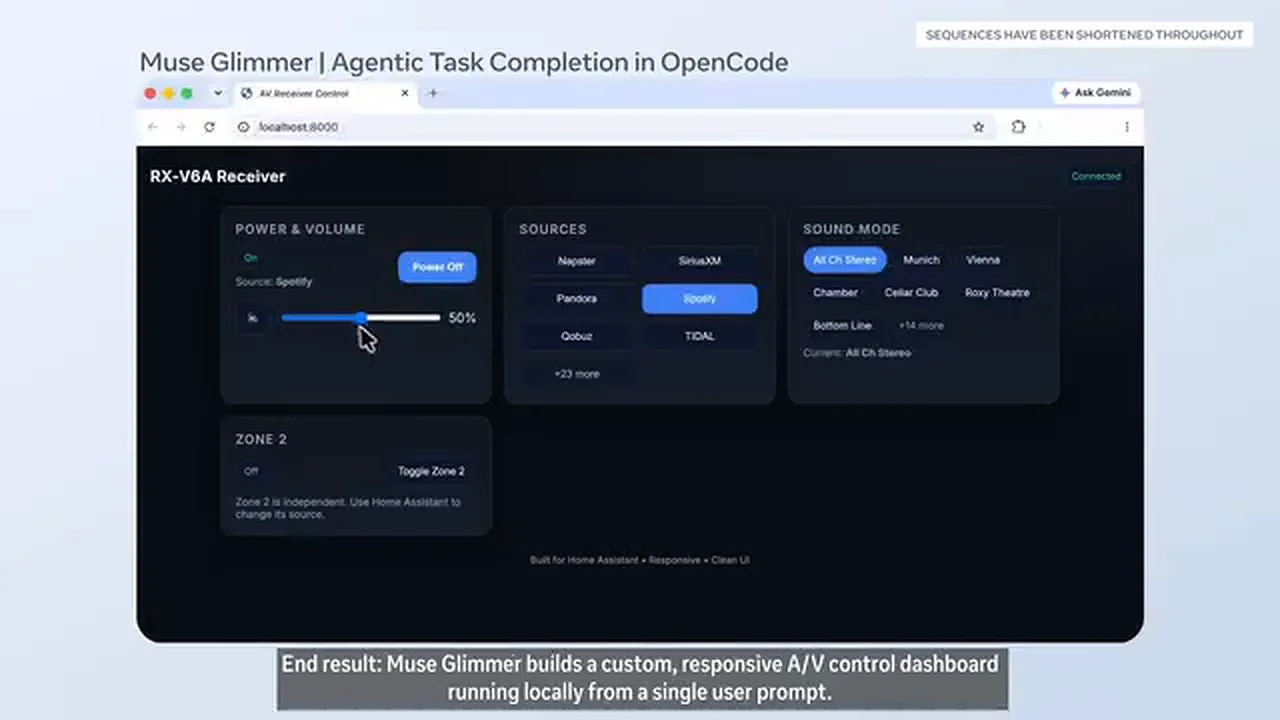
What stands out is not how the dashboard looks, but that nobody stepped in. The model pauses to ask for the token, resumes once it has it, and corrects itself when an API call comes back wrong.
Benchmark Results 📊
Meta compares the model against two strong contenders in its size class: Gemma4-31B and Qwen3.6-27B. All three were measured with thinking mode on.
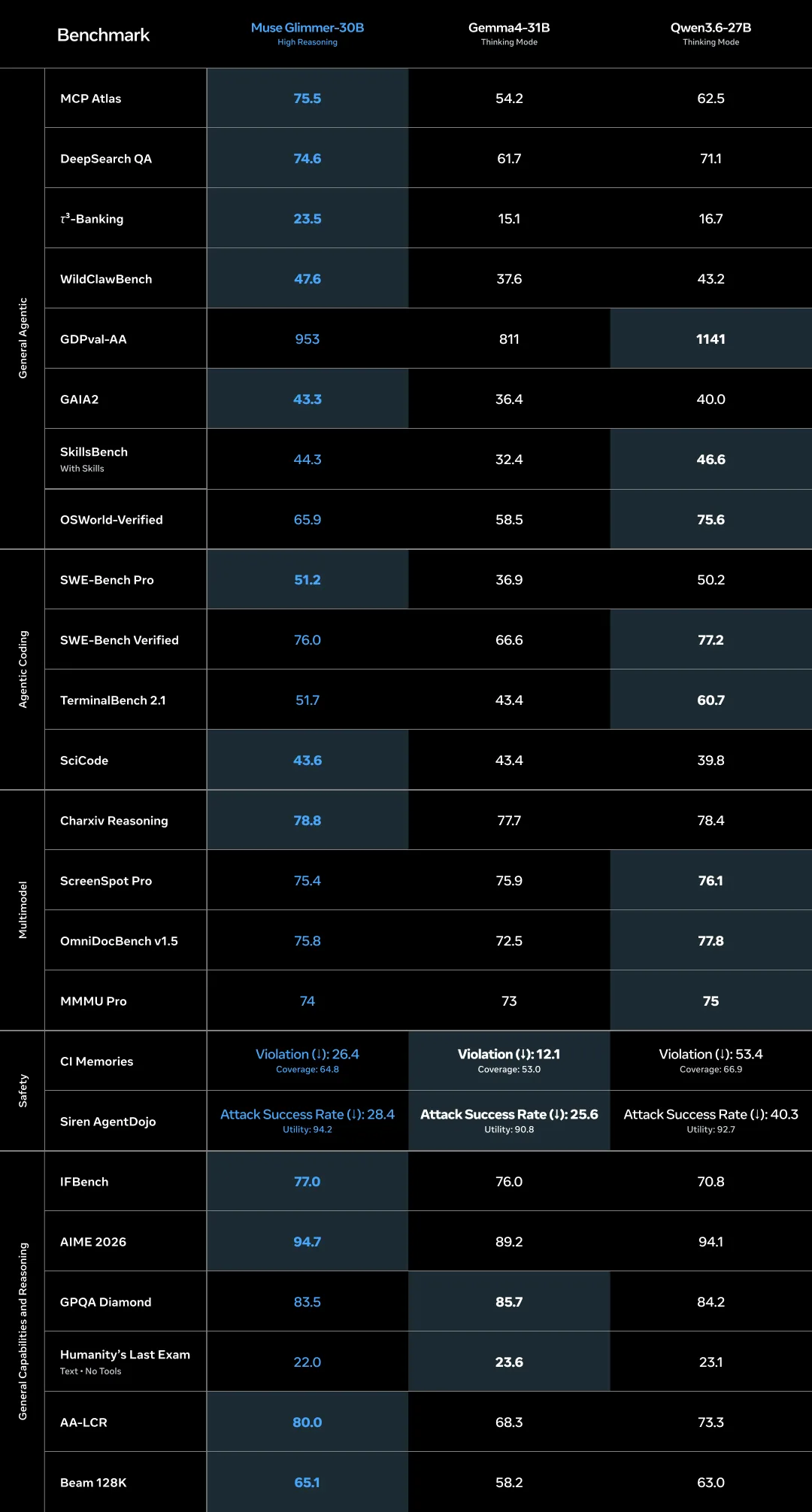
The table is hard to read on mobile, so here are the rows that matter.
Where Muse Glimmer leads clearly:
- MCP Atlas (tool calling): 75.5, against 54.2 and 62.5. A gap of 13 to 21 points, the widest margin in the whole table.
- DeepSearch QA: 74.6 (61.7 and 71.1).
- 𝛕3-Banking (multi-turn banking scenarios): 23.5, against 15.1 and 16.7. The absolute number is low because the test is hard, but the relative gap is large.
- GAIA2: 43.3, WildClawBench: 47.6, SWE-Bench Pro: 51.2. First place on all three.
- AA-LCR (long-context reasoning): 80.0, against 68.3 and 73.3.
- AIME 2026: 94.7 (89.2 and 94.1). IFBench: 77.0.
Where it falls behind:
- OSWorld-Verified (driving a computer): 65.9. Qwen3.6-27B is well ahead at 75.6.
- TerminalBench 2.1: 51.7 against Qwen’s 60.7.
- SWE-Bench Verified: 76.0 against 77.2. Close.
- GPQA Diamond: 83.5 against Gemma4’s 85.7. HLE Text: 22.0 against 23.6.
- GDPVal-AA: 953 against Qwen’s 1141. A clear gap.
On multimodal the three are nearly tied: 75.4 on ScreenSpot Pro against 75.9 and 76.1, 74 on MMMU Pro against 73 and 75. Vision is not where Muse Glimmer separates itself; it is meant to be good enough for agent work.
The safety rows are interesting too. On Siren AgentDojo the indirect prompt-injection attack success rate is 28.4 (lower is better), where Gemma4 is more resistant at 25.6. But Muse Glimmer posts the highest utility score on the same test at 94.2, meaning it resists the attack and still gets the job done.
What Hardware Does It Need? 💻
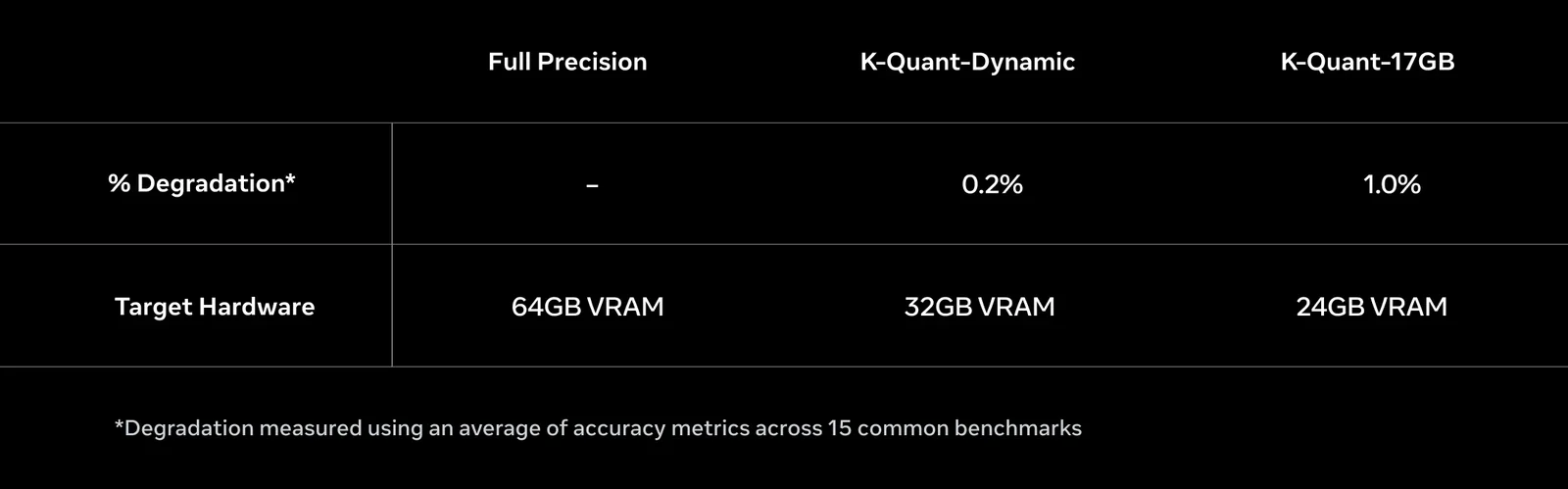
This is where the real engineering sits. At full precision a 30 billion parameter model takes over 55 GB, which no consumer GPU offers. Meta compressed the weights to roughly 4-bit precision, bringing the language model under 20 GB and leaving headroom for the KV cache, the vision encoder and the drafter model.
| Variant | Degradation | Target hardware |
|---|---|---|
| Full precision (BF16) | - | 64 GB VRAM |
| K-Quant-Dynamic | 0.2% | 32 GB VRAM |
| K-Quant-17GB | 1.0% | 24 GB VRAM |
Degradation is measured as an average of accuracy metrics across 15 common benchmarks. A 0.2% loss is effectively nothing, and 1% is a fair price for fitting into 24 GB.
In practice: an RTX 4090, an RTX 5090, or an Apple Silicon Mac with 32 GB of unified memory will do. A 16 GB card will not run this model.
Speed: DFlash speculative decoding
A local model nobody waits for is a local model nobody uses. Muse Glimmer ships with a small “drafter” based on DFlash. Normally a model writes one token at a time. DFlash proposes blocks of 16 tokens at once, and the main model verifies them in parallel, accepting the correct ones and fixing the rest. Output quality is identical; only the waiting shrinks.
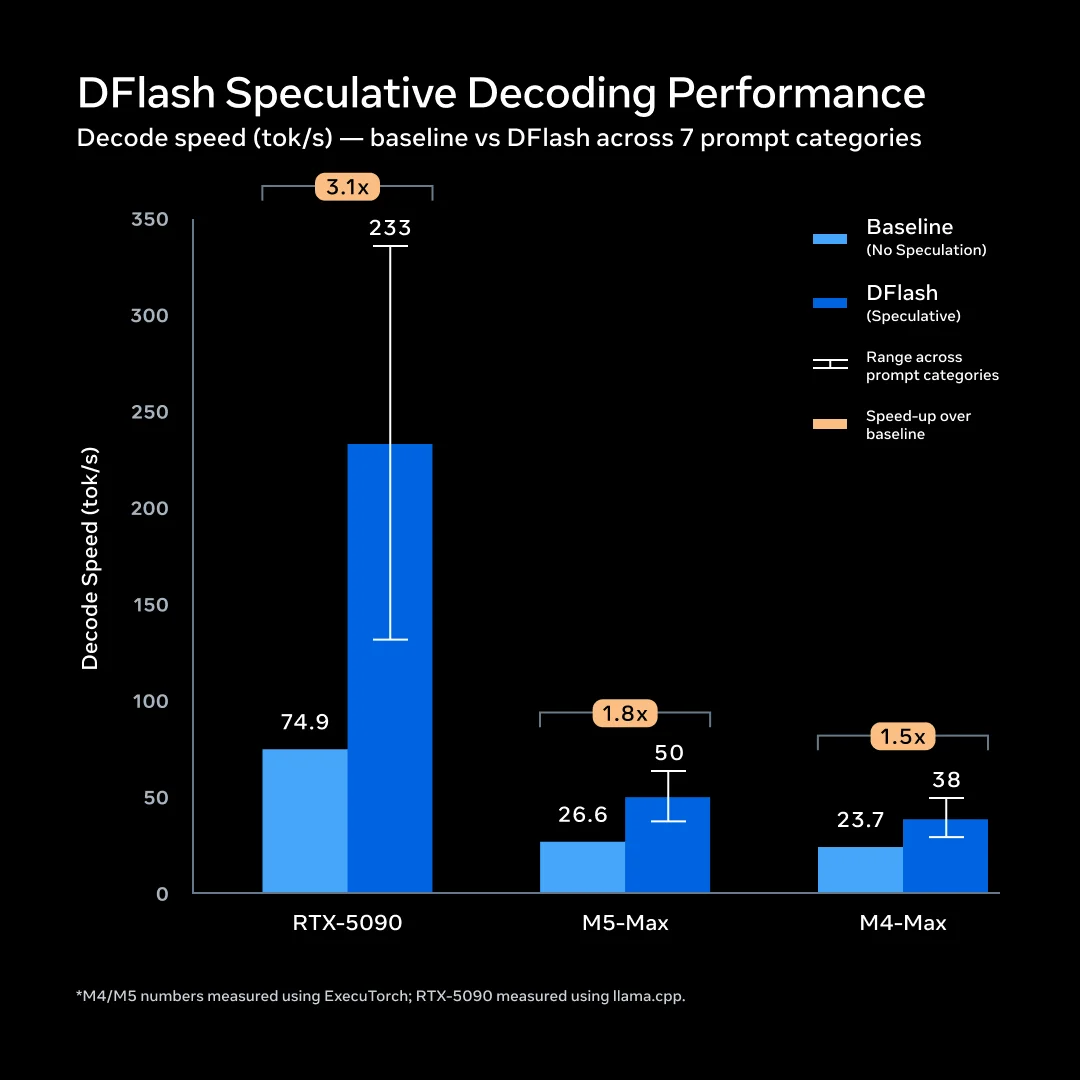
| Hardware | Without drafter | With DFlash | Speedup |
|---|---|---|---|
| NVIDIA RTX 5090 | 74.9 tok/s | 233.4 tok/s | 3.1x |
| Apple M5 Max | 26.6 tok/s | 50.2 tok/s | 1.8x |
| Apple M4 Max | 23.7 tok/s | 37.8 tok/s | 1.5x |
Measurements used the K-Quant-17GB build, batch size 1 and greedy decoding, on ExecuTorch for the Macs and llama.cpp for the RTX. 233 tokens per second is well past reading speed; 37 tok/s is comfortable for chat but asks for patience in long agent loops.
Meta also showed the difference side by side: the same LRU cache coding prompt running in two windows at once on a 64 GB MacBook Pro M5 Max. DFlash is on in the left window and off in the right.
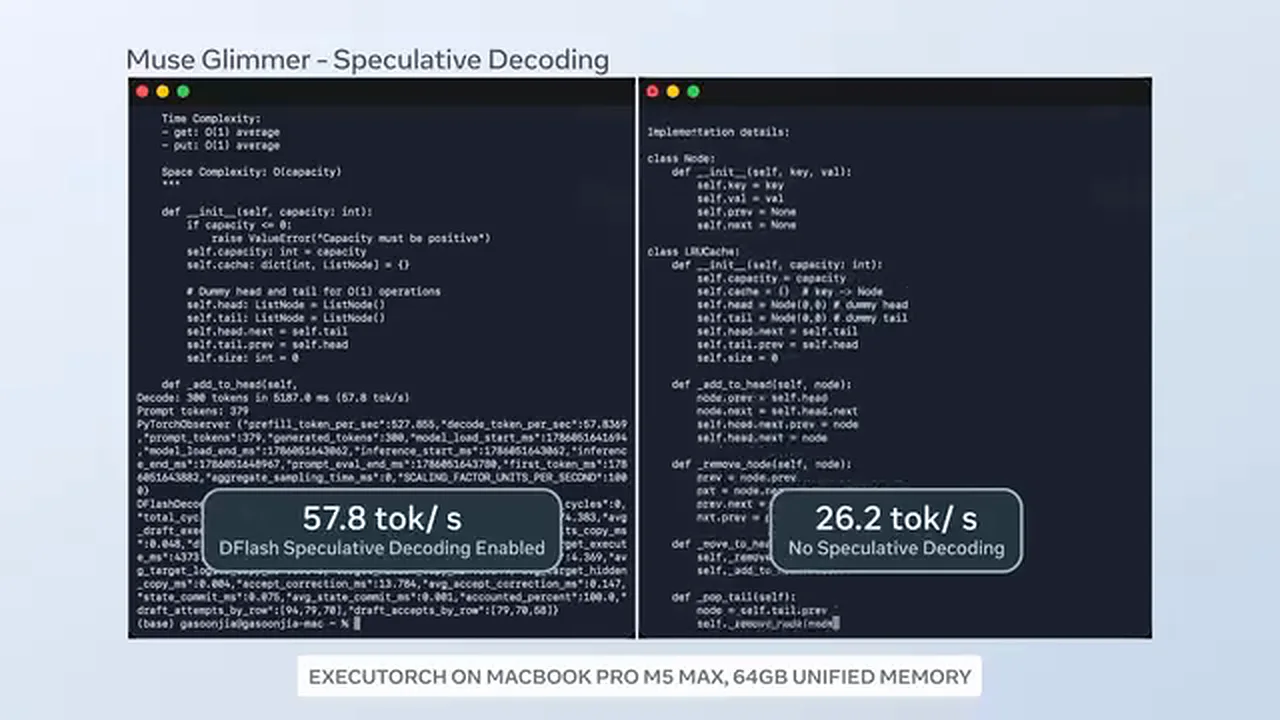
That run measures 57.8 against 26.2 tokens per second, above the average in the table. The reason is that code generation suits speculative decoding particularly well: code follows predictable patterns, so more of the drafter’s 16-token blocks get accepted. Both demo videos are on Meta’s announcement page.
How to Download and Run It 🚀
The weights live under the meta-models account on Hugging Face. There are four artifacts: BF16 full weights, GGUF quantized builds, the DFlash drafter and an ExecuTorch build.
pip install huggingface_hub
huggingface-cli download meta-models/Muse-Glimmer-30B --local-dir ./muse-glimmer-30b
The repository ships the safetensors weights along with the tokenizer, the chat template and the vision preprocessor config. Which artifact you want depends on the job:
| Use case | Artifact |
|---|---|
| Single-GPU server or workstation | Muse-Glimmer-30B (BF16) |
| Quantized local inference | Muse-Glimmer-30B-GGUF |
| Speculative decoding | Muse-Glimmer-30B-assistant (DFlash drafter) |
| Edge devices | Muse-Glimmer-30B-ExecuTorch-PTE |
Meta says ready-made packages for Ollama, LM Studio and Unsloth, plus optimized llama.cpp, ExecuTorch and MLX integrations, land in the coming days. For serving at scale it lists vLLM and SGLang, and for a quick try Together AI, Fireworks AI and OpenRouter. On the hardware side, joint optimization work with AMD, Arm, Dell, Intel and NVIDIA is underway.
Chat template and recommended settings
Muse Glimmer’s prompt format is not Llama’s. Every turn opens with <|start|>, names its role, separates the body with <|message|> and closes with <|eot|>. Do not build it by hand, use apply_chat_template:
from transformers import AutoTokenizer

tokenizer = AutoTokenizer.from_pretrained("meta-models/Muse-Glimmer-30B")

messages = [
    {"role": "system", "content": "You are a senior Python engineer."},
    {"role": "user", "content": "Explain speculative decoding in two sentences."},
]

prompt = tokenizer.apply_chat_template(
    messages,
    tokenize=False,
    add_generation_prompt=True,
    reasoning_strength="high",   # xhigh, high, medium or low
)
The model card recommends temperature = 1.0, top_p = 0.95, top_k = 64. Use high or xhigh for complex problem solving, coding and agentic work.
If you want to pass images, load AutoProcessor instead of AutoTokenizer, since the processor handles image preprocessing.
Tool calling: the ATEM format
The model emits tool calls in its own XML-like format called ATEM. You pass OpenAI-style function schemas to apply_chat_template through the tools argument, and the template renders the tool catalog into the system turn.
Muse Glimmer does not support parallel tool calls. It calls exactly one tool per turn, and you have to return that result before asking it to pick the next one. If your workflow fans out to five files at once, this is a real design constraint.
The good news: serve the model behind vLLM’s or llama.cpp’s OpenAI-compatible server and it parses ATEM for you, exposing standard tool_calls JSON. You never touch ATEM directly.
Limitations and Safety
Meta lists the limits plainly in the model card:
- No audio in or out. Text and images in, text out.
- Not optimized for video. Video is processed as individual frames.
- Quantized inference can show minor quality differences in edge cases versus full precision.
- Not every language in the training data was evaluated; performance can drop outside the strongly supported set.
- The model is not intended for anyone under 18.
On safety, Meta says it evaluated across four axes: content safety, agentic risk (confirmation for irreversible actions, data minimization, prompt-injection resistance), privacy, and preparedness (chemical and biological, cyber, loss of control). The model does not meet Meta’s own “Frontier AI” definition, since it is clearly weaker than Muse Spark. On chem/bio benchmarks it sits in line with its size class and below Gemma4-31B on several rows.
Meta’s own recommendation is explicit: do not deploy the model as an endpoint by itself, wrap it in guardrails, and keep human confirmation for irreversible actions in agents that touch the real world.
Who Is This For?
People building local agents. This is the target audience. With a 24 GB card you can now run an offline agent that touches your files and calls your tools.
People whose data cannot leave the building. Hospitals, law firms, defense, finance. Apache 2.0 permits commercial use, so on-premise deployment has no licensing blocker.
People cutting cost. What you pay per token in the cloud becomes an electricity bill here. To see what your current cloud spend looks like, put your input and output token counts into our LLM cost calculator and compare models side by side.
Who it is not for: anyone on a 16 GB card or smaller, anyone building audio applications, anyone whose workflow depends on parallel tool calls, and anyone chasing the top score in pure software engineering. For that last group Qwen3.6-27B is still a few points ahead.
The Bigger News: Muse Spark 1.2 Is Opening Too
This is the part of the announcement that got buried. On the same day, Mark Zuckerberg and Alexandr Wang, who leads Meta Superintelligence Labs, said the weights for Muse Spark 1.2 will be released as well. Muse Spark is the teacher model Glimmer was distilled from, and it is currently served only through a paid API with a 1 million token context window.
No date was given, only “soon” and “in the coming weeks.” Whether the license will also be Apache 2.0 is unclear. If it lands, it means the weights of a frontier-class model going public, which is a far bigger story than Glimmer itself.
So it is more accurate to read Muse Glimmer not on its own but as the small half of a two-part move: one model that fits your device, one that is the flagship.
The Bottom Line
Muse Glimmer is not a claim to be the strongest model. Meta says outright that Muse Spark is more capable. The claim is narrower: a model good enough to do agent work can be small enough to fit your device and fast enough to actually use.
The most meaningful row in the table is that 21-point gap on MCP Atlas. The competitors trade blows on general capability and even win several rows. Where Muse Glimmer separates itself is tool calling and multi-step task completion, which is exactly the day job of a local agent.
Because the weights are open, that claim will not stay untested for long. Once the Ollama and LM Studio builds land, community measurements will follow. Until then the only source is Meta’s own table, and it is worth reading it as such.